Author: Prabhakaran Ramanathan

  • One Airport, Many Airlines: The Architecture Behind a Multi-Tenant Backend

    One Airport, Many Airlines: The Architecture Behind a Multi-Tenant Backend

    How one deployed server serves hundreds of isolated tenants — the design decisions, the code patterns, and the traps we navigated along the way.


    The Problem We Set Out to Solve

    Picture a major international airport. Thousands of passengers arrive every hour. Some are flying Emirates, some are on Singapore Airlines, some are on budget carriers. They all walk through the same entrance, breathe the same air-conditioned air, use the same runways — yet an Emirates passenger never accidentally boards a Singapore Airlines flight. Their luggage never ends up on the wrong conveyor belt.

    How does one building serve hundreds of airlines and thousands of passengers without a single mix-up?

    That is the exact problem a multi-tenant backend solves. One deployed server. One database. Hundreds of schools, each completely isolated from the others, each feeling like they have their own private system.

    This is how we built that airport.

    The Framework — The Airport Building Itself

    The entire backend is built on NestJS, a Node.js framework that enforces structure through modules, controllers, and services.

    If the backend is an airport:

    Every piece of logic lives in exactly the right terminal. Nothing bleeds into somewhere it does not belong.

    The Terminal Map — How the Modules Are Organised

    The application has three passenger terminals and one operations centre, each with a separate entrance and completely independent staff:

    Each module is imported into the root AppModule exactly once. They share a database connection through a global PrismaModule, but their routes, guards, and services never directly call into each other.

    The Boarding Pass — Tenant Identity in the JWT

    Every airline passenger carries a boarding pass. It contains their name, their destination, their airline — and crucially, it cannot be forged. In our system, the JWT is the boarding pass.

    When a user logs in, the token payload includes not just their user ID and role, but their tenant ID — the unique identifier of the school they belong to:

    // auth.service.ts — signing the boarding pass
    async signIn(dto: SignInDto): Promise<AuthResponse> {
      const user = await this.validateUser(dto.email, dto.password);
    
      const payload: JwtPayload = {
        sub: user.id,
        email: user.email,
        role: user.role,
        tenantId: user.school_id,  // ← the airline code on the boarding pass
      };
    
      return { access_token: await this.jwt.signAsync(payload) };
    }

    Why embed tenantId in the token?

    Every request is stateless — no session lookup, no extra DB call to figure out which school this user belongs to. The tenant identity travels with the request, verified by the JWT signature. Fast, tamper-proof, and zero extra round trips.

    The Security Scanner — The Tenant Guard

    Knowing a passenger’s airline code is not enough. The gate scanner must actively verify that they are only trying to board their own flight. Our equivalent is the Tenant Guard — a NestJS guard that runs after JWT verification on every protected route.

    // tenant.guard.ts
    @Injectable()
    export class TenantGuard implements CanActivate {
      canActivate(ctx: ExecutionContext): boolean {
        const req = ctx.switchToHttp().getRequest();
        const user: JwtPayload = req.user; // set by JwtAuthGuard
    
        // URL param: /schools/:schoolId/students
        const urlTenantId = req.params.schoolId;
    
        if (urlTenantId && urlTenantId !== user.tenantId) {
          throw new ForbiddenException('Wrong terminal.');
        }
    
        return true;
      }
    }

    This guard runs on every admin and student route. An admin from School A who somehow crafts a request to School B’s endpoint gets a 403 Forbidden — they tried to walk through the wrong gate.

    The Conveyor Belt — Tenant-Scoped Database Queries

    The guard stops cross-tenant access. But we need a second layer: the database queries themselves must always be scoped to the correct tenant. If the guard is the gate scanner, the database layer is the conveyor belt — luggage must only reach the right carousel.

    Every service method that reads data takes tenantId as an explicit parameter, extracted from the JWT payload and passed down from the controller:

    // students.service.ts
    async findAll(tenantId: string, page: number) {
      return this.prisma.student.findMany({
        where: {
          school_id: tenantId,  // ← always scoped
          is_active: true,
        },
        skip: (page - 1) * 20,
        take: 20,
        orderBy: { created_at: 'desc' },
      });
    }

    Defence in depth

    The guard and the DB-level scope are both needed. The guard catches bad URLs. The DB scope catches any code path that forgets to check — a background job, an admin shortcut, a future developer who skips the guard. Never rely on a single layer for tenant isolation.

    The Full Request Journey

    Here is what happens from the moment a teacher at School A sends a request to fetch her students, to the moment she gets the list back:

    Request Lifecycle — Tenant-Scoped Read

    Shared vs Isolated Data

    Not everything belongs to a single tenant. Some data is shared across the whole platform — think currency lists, country codes, global feature flags. In airport terms: the duty-free shops and the runways are shared infrastructure that serves all airlines.

    The Tradeoffs We Accepted

    Row-level multi-tenancy (one database, school_id on every table) is the simplest approach but not the only one. We chose it deliberately:

    • Schema-per-tenant gives stronger isolation and easier backup per tenant — but migrations become a nightmare at scale. Running one migration across 500 Postgres schemas in sequence is a 2 AM incident waiting to happen.
    • Database-per-tenant is the gold standard for isolation — but the infrastructure cost is proportional to tenant count. Fine for enterprise; impractical for hundreds of small schools.
    • Row-level (our approach) is operationally simple — one DB, one migration, shared connection pool — but requires discipline at the query layer. One missing WHERE school_id = ? is a data leak. The two-layer defence (guard + DB scope) is what makes this safe.

    The airport insight: the building itself doesn’t guarantee that Emirates passengers don’t board Singapore flights. The signs, the gate agents, the boarding pass scanners — the process does. Architecture is the same. The framework gives you the structure; the guards and query patterns are what actually enforce the rules.

    A multi-tenant system is only as isolated as its least-careful query. Write it once, enforce it everywhere, and trust the pipeline — not individual developers remembering to filter correctly.

    What I’d Do Differently

    • Centralise tenant extraction early. We initially extracted tenantId manually in each controller. Pulling it into a shared decorator (@TenantId() as a param decorator) eliminated the repetition and made it impossible to forget.
    • Add a Prisma middleware for safety. A Prisma middleware that automatically injects school_id into every findMany / findFirst call — via a request-scoped context — is a stronger guarantee than trusting every service author to remember the filter.
    • Test cross-tenant access explicitly. Write integration tests that log in as a user from Tenant A and attempt to read Tenant B’s data. If those tests exist and pass, you have proof the isolation holds. If they don’t exist, you have hope.
    • Log tenantId on every request. Correlating logs across a multi-tenant system is painful without a consistent tenant identifier on every log line. Add it to your logging interceptor from day one.

    Multi-tenancy is less about any single clever trick and more about consistent discipline across hundreds of small decisions. The framework enforces structure. The guards enforce identity. The query layer enforces scope. All three have to hold — and when they do, one server really can serve a thousand schools without any of them knowing the others exist.

    Every passenger lands at the right gate. Every bag reaches the right carousel. One airport, many airlines — one backend, many tenants.
  • Cron Jobs in NestJS: A Simple Guide

    Cron Jobs in NestJS: A Simple Guide

    What is a Cron Job?

    A cron job is a task that runs on its own, again and again, at a fixed time. You do not need to click a button. The computer does the work for you.

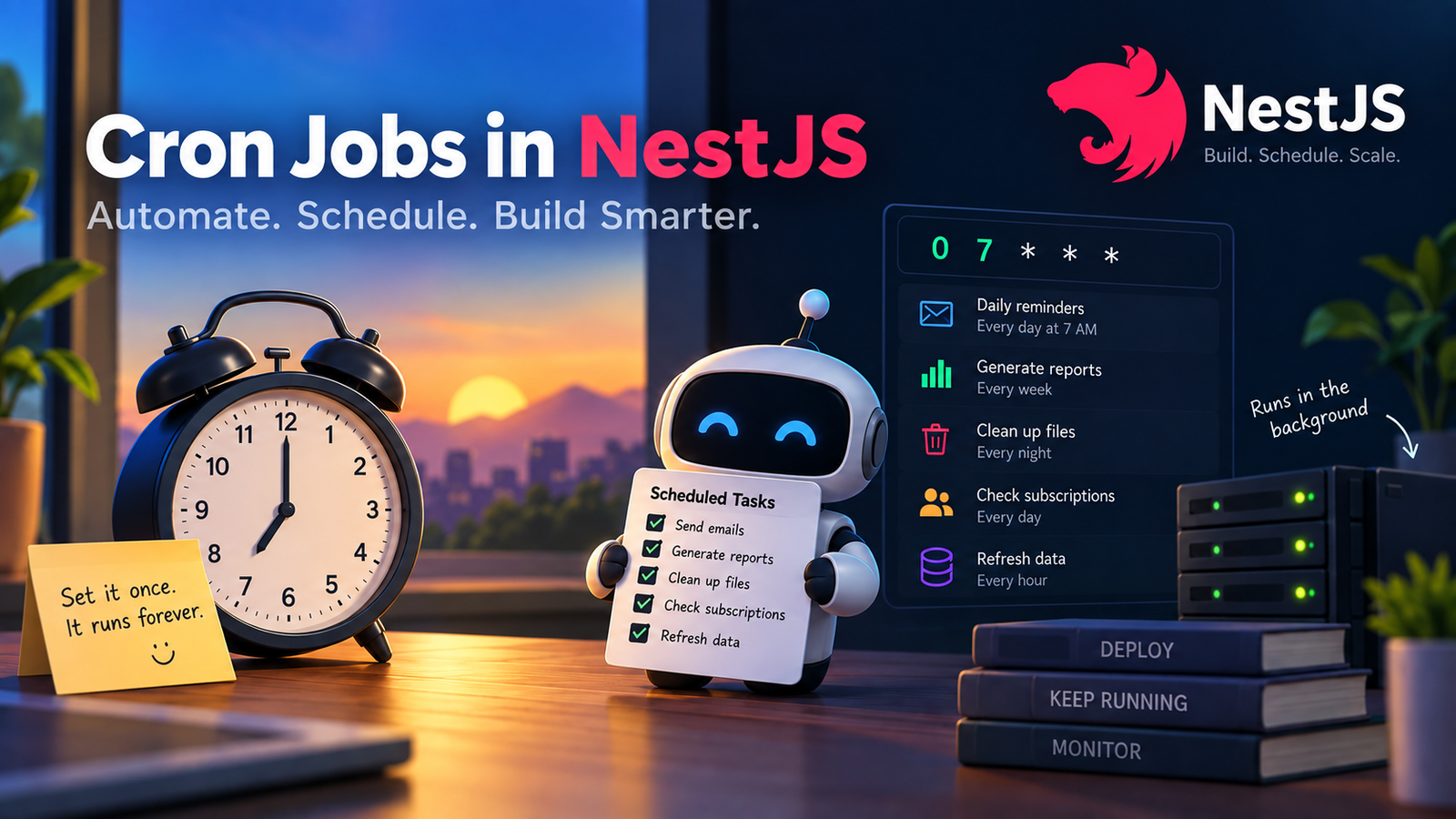
    Think about your daily life. Every morning, your alarm rings at 7 AM. You did not press it. It just knows the time and rings on its own. A cron job works the same way for computers. It “wakes up” at a set time and does a task.

    Some real-life examples:

    • Your phone backs up your photos every night at 2 AM.
    • A bank sends you a monthly statement on the 1st of every month.
    • A water purifier reminds you to change the filter every 3 months.
    • A gym app sends a reminder every Monday to renew your membership.

    All these are “cron jobs” in real life. Someone set a rule once, and now it repeats forever without extra effort.

    Why Do We Need Cron Jobs in Software?

    In software, we use cron jobs for tasks like:

    • Sending daily reminder emails to users.
    • Cleaning up old, unused files every night.
    • Generating a sales report every week.
    • Checking for expired subscriptions every day.
    • Refreshing cached data every hour.

    These tasks are repetitive. Doing them by hand is boring and can lead to mistakes. A cron job removes that human effort.

    How Cron Jobs Work

    A cron job uses a “cron expression” to decide when to run. It looks like this:

    *  *  *  *  *

    Each * stands for a time unit:

    1. Minute (0–59)
    2. Hour (0–23)
    3. Day of the month (1–31)
    4. Month (1–12)
    5. Day of the week (0–7, where 0 and 7 are Sunday)

    For example:

    • 0 7 * * * means “run every day at 7 AM.”
    • 0 0 1 * * means “run at midnight on the 1st of every month.”
    • 0 9 * * 1 means “run every Monday at 9 AM.”

    This is just like setting a repeat alarm on your phone.

    Using Cron Jobs in NestJS

    NestJS is a popular framework for building backend applications with Node.js. It has a simple way to add cron jobs using a package called @nestjs/schedule.

    Step 1: Install the Package

    npm install --save @nestjs/schedule

    Step 2: Import the Module

    Open your app.module.ts file and add ScheduleModule:

    import { Module } from '@nestjs/common';
    import { ScheduleModule } from '@nestjs/schedule';

    This tells your app: “Get ready, we will run some scheduled tasks.”

    Step 3: Create a Service with a Cron Job

    Now create a service file, for example tasks.service.ts:

    import { Injectable, Logger } from '@nestjs/common';
    import { Cron, CronExpression } from '@nestjs/schedule';
    @Injectable()
    export class TasksService {
      private readonly logger = new Logger(TasksService.name);
      @Cron(CronExpression.EVERY_DAY_AT_7AM)
      handleMorningReminder() {
        this.logger.log('Good morning! Sending daily reminders now.');
        // your logic here, like sending emails
      }
    }

    Here, @Cron() is a decorator. It tells NestJS: “Run this function automatically at 7 AM every day.” This is just like setting your morning alarm, but for code.

    You can also write your own custom time pattern:

    @Cron('0 0 * * *') // runs every midnight
    handleMidnightCleanup() {
      this.logger.log('Cleaning up old files...');
    }

    Step 4: Add the Service to Your Module

    import { Module } from '@nestjs/common';
    import { TasksService } from './tasks.service';
    @Module({
      providers: [TasksService],
    })
    export class TasksModule {}

    That’s it. Your cron job is now live inside your app.

    Everyday Life Example Mapped to Code

    Real-Life Example NestJS Cron Job Alarm rings every day at 7 AM @Cron(CronExpression.EVERY_DAY_AT_7AM) Rent reminder on 1st of month @Cron('0 0 1 * *') Weekly grocery list every Sunday @Cron('0 10 * * 0') Watering plants every 3 hours @Cron('0 */3 * * *')

    Once you understand your daily routine, cron expressions start to feel very natural.

    How to Deploy a NestJS App with Cron Jobs

    Once your cron job works on your laptop, you need to put it on a server so it keeps running all the time, even when your laptop is off. This is called deployment.

    Here are simple steps to deploy it:

    1. Build Your Application

    First, turn your TypeScript code into plain JavaScript, which servers can run:

    npm run build

    2. Choose a Hosting Option

    You can deploy your NestJS app on platforms like:

    • VPS (Virtual Private Server), like DigitalOcean or AWS EC2
    • Platform as a Service, like Render, Railway, or Heroku
    • Containers, using Docker and Kubernetes

    3. Keep the App Running Always

    A cron job only works if your app is always running. On a normal computer, the app stops when you close the terminal. On a server, we use tools to keep it alive:

    • PM2: A process manager that restarts your app if it crashes.
    npm install -g pm2
    pm2 start dist/main.js --name my-app
    • Docker: Package your app in a container so it runs the same way everywhere.
    • Systemd: A Linux tool to keep services running in the background.

    4. Watch Out for Multiple Instances

    If you deploy your app on more than one server (for scaling), your cron job might run multiple times at the same moment. This can cause duplicate emails or duplicate reports.

    To avoid this, you can:

    • Run cron jobs only on one dedicated instance.
    • Use a distributed lock, like Redis, so only one server runs the job at a time.
    • Use a separate worker service just for scheduled tasks, apart from your main app.

    5. Set the Correct Time Zone

    Your server might be in a different time zone than your users. Always set the time zone clearly:

    @Cron(CronExpression.EVERY_DAY_AT_7AM, {
      timeZone: 'Asia/Kolkata',
    })
    handleMorningReminder() {
      this.logger.log('Sending reminder in Indian time zone.');
    }

    This is like setting your alarm clock to your local time, not someone else’s.

    6. Monitor Your Cron Jobs

    After deployment, keep an eye on your jobs. Use logging tools or services like:

    • Application logs (console or file-based)
    • Monitoring tools like Sentry or Datadog
    • Simple alerts if a job fails to run

    Conclusion

    A cron job is like a personal assistant for your app. It remembers to do repeated tasks, right on time, without anyone pushing a button. Just like your morning alarm or your monthly bill reminder, a cron job quietly works in the background.

    In NestJS, setting up a cron job is easy with the @nestjs/schedule package. But remember, writing the code is just one part. Deploying it correctly, keeping it always running, and avoiding duplicate runs are just as important.

    Once you get this right, your app will handle repeated tasks smoothly, just like a well-trained assistant who never forgets.

  • Why Your App’s “Brain” Should Live on the Backend, Not the Frontend

    Why Your App’s “Brain” Should Live on the Backend, Not the Frontend

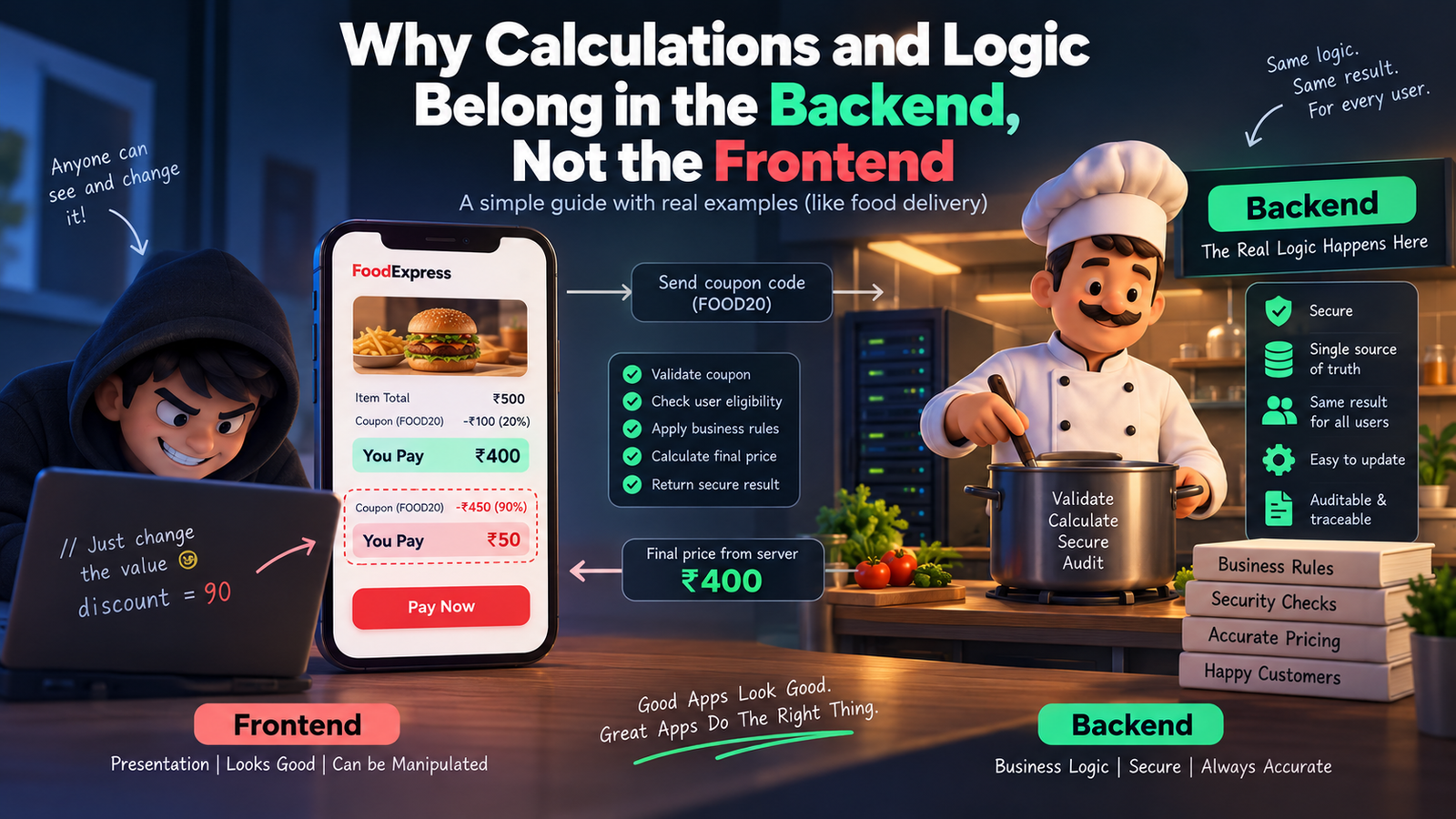
    Picture this. You’re building a food delivery app. A customer orders food worth ₹500, adds a coupon for 20% off, and the frontend proudly shows “You pay ₹400.” Cool, right?

    Except… what if the customer opens the browser console, changes that 20% to 90%, and hits pay? If your discount math lives only in the frontend, you just lost ₹450 on that order. This one scenario explains almost everything about why calculations and logic belong on the backend, not the frontend.

    Let’s break this down in the friendliest way possible.

    First, What Do We Even Mean by “Frontend” and “Backend”?

    Think of a restaurant. The frontend is the waiter — the person you see, the menu you touch, the smile you get when your food arrives. The backend is the kitchen — where the actual cooking happens, where the chef decides how much salt goes in, how long to fry something, and whether an ingredient has gone bad.

    You never let a customer walk into the kitchen and decide their own recipe. Similarly, you never let the frontend decide your app’s real logic. The frontend’s job is to display things beautifully. The backend’s job is to decide things correctly.

    Why Frontend Logic is Risky (The Disadvantages)

    1. Anyone can see and change it. Everything running in the browser — your JavaScript, your calculations, your “if-else” rules — is visible to anyone who opens Developer Tools. It’s like writing your restaurant’s secret recipe on a whiteboard facing the customers. A curious (or malicious) user can tweak prices, unlock premium features, or bypass validations in seconds.

    2. It’s easy to manipulate. Since the code and data both sit in the user’s browser, a smart user can literally rewrite your app’s math using browser console commands. Discounts, wallet balances, loan EMI calculations — all of it becomes editable by whoever’s using the app.

    3. Different devices, different results. Frontend logic runs on the user’s device — phone, laptop, tablet — each with its own browser, its own quirks, sometimes even outdated app versions. If your logic lives there, two users could get two different answers to the same calculation, depending on their device.

    4. No single source of truth. If ten different frontend clients (web, Android, iOS) all calculate the same thing independently, you’ll eventually get ten slightly different answers. Bugs creep in. Trust breaks down.

    5. Sensitive data gets exposed. To calculate something on the frontend, you often need to send it all the raw data first — prices, taxes, internal rules, maybe even other users’ info. That’s a data leak waiting to happen.

    Why Backend Logic Wins (The Advantages)

    1. It’s a locked kitchen. The backend runs on your server, completely out of the user’s reach. They can inspect the frontend all they want, but they can never see or touch the actual logic running behind the API.

    2. One source of truth. Whether the request comes from a website, an Android app, or an iOS app, the backend calculates the answer the same way, every single time. Consistency guaranteed.

    3. Real security checks happen here. Your backend can verify: Is this coupon still valid? Has this user already used it? Does this account actually have enough balance? These are questions only a trusted, protected environment should answer.

    4. Easy to update without breaking things. Change a tax rule or a pricing formula on the backend, and it instantly applies everywhere — no need to update and re-release five different apps.

    5. Auditable and traceable. Backend calculations can be logged, monitored, and audited. If something goes wrong, you can trace exactly what happened. Try doing that with logic running invisibly inside someone’s browser.

    Real-Time Example: The Coupon Discount

    Let’s compare both approaches with our food delivery example.

    Frontend-only approach: The app calculates: finalPrice = price - (price * discount / 100). This all happens inside the browser’s JavaScript. The value of discount is sitting right there in the page’s source code or network request. A user opens dev tools, changes discount from 20 to 90, and the frontend happily displays a fake, massively discounted price. If your backend blindly trusts this displayed value during checkout, you just got scammed.

    Backend-driven approach: The frontend simply sends: “user wants to apply coupon FOOD20.” That’s it — no math, no discount percentage, nothing sensitive. The backend then checks its own database: Is this coupon valid? Has it expired? Has this user already used it? Only after all checks pass does the backend calculate the real final price and send it back. The frontend just displays whatever number the backend gives it — no thinking, no deciding, no risk.

    Another Quick Example: Bank Interest Calculator

    Imagine a savings app showing interest earned. If the interest formula runs on the frontend, a user could tamper with the principal amount or the rate shown in the request and make the app “believe” they earned more interest than they actually did. On the backend, the interest is calculated using the actual account data stored securely in the database — untouchable, unfakeable, and always accurate.

    So, What Should the Frontend Actually Do?

    The frontend isn’t useless in all this — it still has an important job: making things feel fast and smooth. Simple things like showing a live character counter, instantly validating that an email “looks” correct, or giving a quick preview of a total before confirming, are totally fine on the frontend. These are just for a nice user experience, not the final truth. The backend always re-checks and re-calculates everything before anything real happens (like a payment or a database update).

    Think of it like the waiter repeating your order back to you nicely — but the actual bill still comes from the kitchen and the cash counter, not from what the waiter guessed.

    The Bottom Line

    Frontend = presentation and experience. Backend = truth and trust.

    Let the frontend focus on looking good and feeling fast. Let the backend handle anything involving money, security, business rules, or sensitive decisions. That’s not just a coding convention — it’s what keeps your app, your users, and your business safe.

  • Plan First, Build Later: Why Apps Need a Recipe Before They Need a Kitchen

    Plan First, Build Later: Why Apps Need a Recipe Before They Need a Kitchen

    Imagine you invite friends over for dinner. You didn’t check what ingredients you have. You didn’t decide the menu. You just walk into the kitchen and start cooking… something. Twenty minutes later, you’re missing salt, the oven isn’t even on, and your friends are hungry and confused.

    That’s exactly what happens when people build an app without planning first.

    Planning isn’t the boring part. It’s the recipe. And nobody cooks a good meal without one.

    Why Skipping the Plan Always Backfires

    You know that feeling when you pack for a trip in five minutes, throwing random clothes in a bag while the taxi is honking outside? You land at your destination and realize… no charger, no jacket, three left shoes.

    Skipping planning for an app feels exciting in the moment. But it always costs more time later. Fixing a mistake after building is like renovating a house after it’s already painted — way more expensive than just planning the layout first.

    The Checklist Before You Even Touch a Keyboard

    Think of building an app like planning a birthday party. You wouldn’t just show up with balloons and hope it works out. You’d think through a few things first:

    1. Why are we even doing this?

    What problem are you solving? “I want to make an app for pet owners” is like saying “I want to throw a party for people.” For who? Why? A better version: “An app that tells new dog owners if their dog’s weird behavior is normal or something to worry about.” Now it has a purpose.

    2. Who is this actually for?

    You can’t build a birthday party for “everyone in the world.” You plan it around the actual guest — kids, grandma, your gym friends — because each needs different food, music, and vibe. Same with an app. Know your real users: their age, their habits, what phone they use, what annoys them.

    3. What exactly are we building?

    This is the guest list of features. Some things are must-haves (cake, obviously). Some are nice-to-haves (a photo booth, if there’s time and money). Some can wait for next year’s party. Sort your app features the same way:

    • Must-have — the app doesn’t work without this
    • Should-have — important, but survivable without it at first
    • Could-have — a nice bonus if there’s time
    • Later — good idea, just not today

    4. How are we building it?

    This is choosing your kitchen tools before cooking. Will you use a gas stove or an oven? Similarly, developers must pick the right tech (what platform, what database, what tools) before starting — switching mid-way is like realizing halfway through baking that your oven doesn’t exist.

    5. What do we have to work with?

    Time, money, and people. If you’re planning a party for 50 people with a budget for 10, that party is going to go badly. Same with apps — know your budget and timeline honestly before promising the world.

    6. What could go wrong?

    Every good party host thinks ahead: “What if it rains? What if someone’s allergic to nuts?” Apps need this thinking too — data privacy rules, app store rules, security. Catching a problem on paper is easy. Catching it after launch is a nightmare.

    Meetings: Not Evil, Just Often Done Wrong

    Meetings get a bad reputation, mostly because of pointless ones that could’ve been a text message. But good meetings before building an app are like a family planning a road trip together — quick check-ins where everyone agrees on the route before anyone starts driving.

    Here’s what those meetings usually look like:

    • Kickoff meeting — Everyone agrees on the big goal. Basically: “Why are we building this, and what does winning look like?”
    • Requirements meeting — Turning fuzzy ideas (“make it easy to use!”) into clear, specific instructions developers can actually follow.
    • Design review — Looking at sketches of the app before any code is written. It’s way cheaper to erase a pencil line than to rebuild a finished button.
    • Feasibility check — The reality-check meeting. “Yes, we can add that voice assistant feature. No, not with this budget and in two weeks.”
    • Sprint planning — Breaking the huge to-do list into small, doable chunks, like cleaning a messy house room by room instead of staring at the whole mess and giving up.
    • Risk review — The “what could go wrong” conversation, done calmly, before it becomes an actual emergency.

    Every meeting has one real job: catch confusion early, while it’s still cheap and easy to fix.

    The Simple Test for a Good Plan

    If you can’t explain your app plan to your grandma in two sentences, it’s not ready yet. A good plan is simple enough that a brand new team member could read it and instantly understand what to build and why.

    The Takeaway

    Skipping planning doesn’t save time. It just moves the pain to later — usually as a stressful, expensive “let’s redo this” moment instead of a calm conversation on day one.

    So next time you’re excited to build an app, pause. Write the recipe first. Talk it through. Ask the awkward questions early.

    Your future self, not debugging at midnight because nobody planned properly, will send you a thank-you card.

    Plan smart. Build once. Ship happy.

  • The Sticky Note Strategy: How We Use Redis to Make Our API Blazing Fast

    The Sticky Note Strategy: How We Use Redis to Make Our API Blazing Fast


    A practical walkthrough of the Cache-Aside pattern — what it is, how to implement it in NestJS, and the tradeoffs nobody tells you about upfront.

    The Problem with Going to the Filing Cabinet Every Time

    Imagine you work in a busy office. Every time someone asks you “What’s on today’s lunch menu?” you walk to the basement, unlock the filing cabinet, flip through hundreds of folders, find the answer, walk back upstairs — and give it to them.

    Now imagine 500 people asking the same question, one after another.

    That’s exactly what happens when every API request hits the database directly. The database is powerful, but it lives in the basement. Every trip takes time.

    The real numbers

    A typical PostgreSQL query with joins takes 20–200ms. A Redis read takes under 1ms. For a popular endpoint hit thousands of times per minute, that gap compounds into real infrastructure cost and user-perceived slowness.

    We needed a sticky note on the desk.

    Enter Redis — The Sticky Note on Your Desk

    Redis is an in-memory data store. Unlike a database that reads from disk, Redis keeps everything in RAM — the fastest storage a computer has.

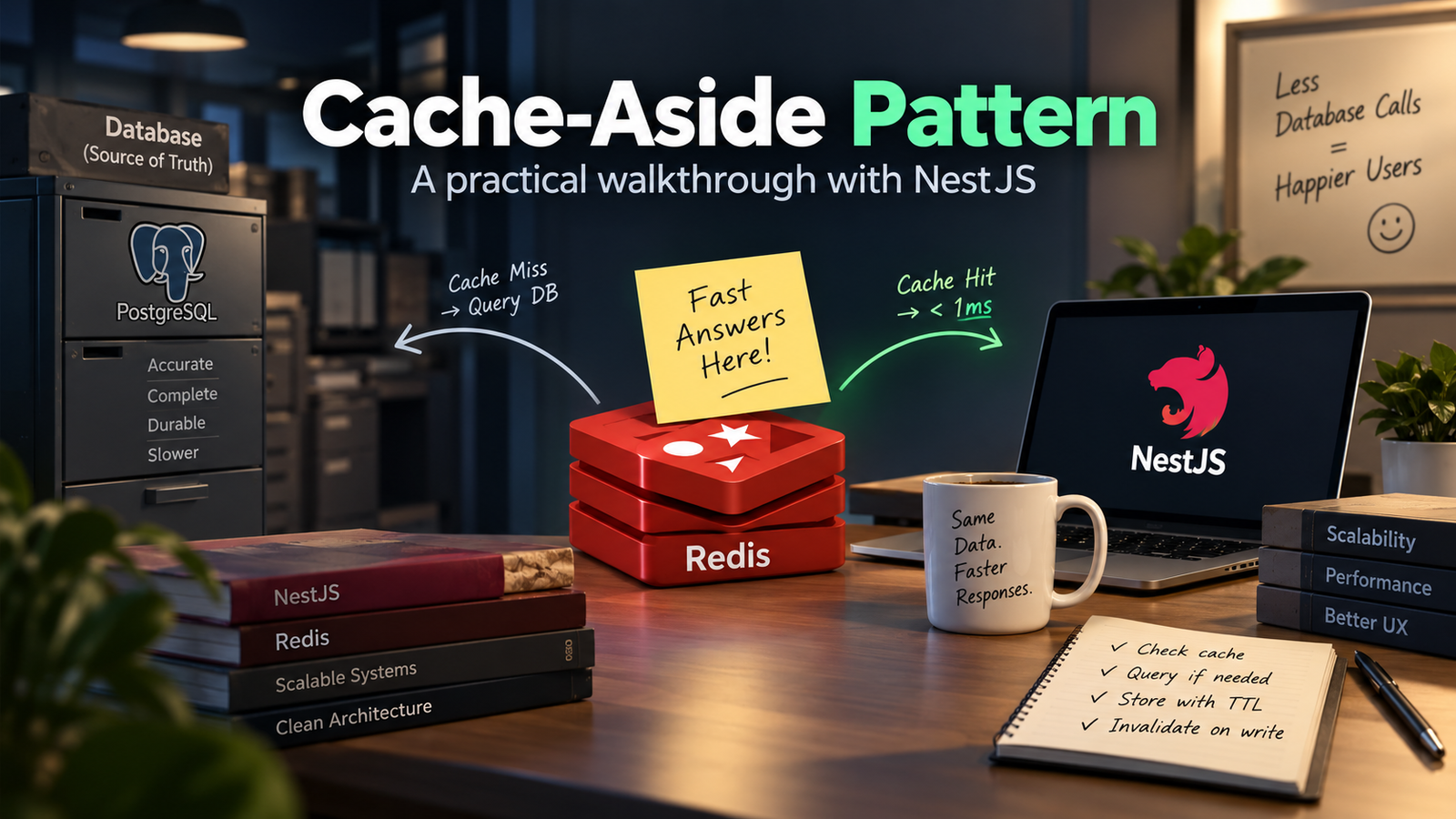
    If the database is a filing cabinet in the basement, Redis is a sticky note pinned right on your monitor.

    🗄️Filing Cabinet (Database)

    Accurate, complete, durable — but slow to reach. Every query walks to the basement and back.

    📝Sticky Note (Redis)

    Limited space, not permanent — but instantly readable. The answer is right there on your desk.

    When someone asks for data, we check the sticky note first. If it has the answer — done. If it doesn’t — we walk to the filing cabinet, get the answer, and write it on a new sticky note for next time.

    This pattern is called Cache-Aside, and it is the backbone of how our system works.

    Cache-Aside: The Pattern in Action

    Cache-Aside (also called lazy loading) has a simple decision tree on every read request:

    Here’s what this looks like in a NestJS service, using ioredis:

    async getUserProfile(userId: string): Promise<UserProfile> {
      const cacheKey = `user:profile:{userId}`;
    
    // 1. check the sticky note
      const cached = await this.redis.get(cacheKey);
      if (cached) {
        return JSON.parse(cached); // cache HIT - instant
      }
      // 2. walk to the filing cabinet
      const user = await this.prisma.user.findUnique({
        where: { id: userId },
        include: { profile: true, preferences: true },
      });
      if (!user) throw new NotFoundException();
      // 3. write a new sticky note (TTL = 5 minutes)
      await this.redis.setex(cacheKey, 300, JSON.stringify(user));
      return user;
    }

    Setting an Expiry — When the Sticky Note Goes Stale

    A sticky note from last Tuesday about today’s lunch menu is worse than useless — it’s wrong. Cached data has the same problem. The fix is a TTL (Time-To-Live): Redis automatically deletes the key after a set number of seconds.

    Choosing the right TTL is a judgment call, not a formula. Ask: how bad is it if this data is stale?

    ⚠ The TTL trap

    Setting TTL too high means users see stale data long after it changed. Setting it too low means your cache hit rate collapses — you’re back to hammering the database. Start conservative (shorter), measure your cache hit ratio, and extend TTLs for data where staleness hasn’t caused problems.

    What We Cache and What We Don’t

    Not every piece of data belongs on the sticky note. After running this in production, here’s the rough split:

    • Good cache candidates: shared data read by many users (public profiles, catalog items, config values, computed aggregates). High read frequency, low write frequency.
    • Bad cache candidates: user-specific transactional data (cart contents, payment status, unread count). Stale state here causes real bugs.
    • Never cache: authentication tokens (they have their own lifecycle), passwords, anything where a stale read has security implications.

    🗒️The Sticky Note Rule

    You’d write “Today’s lunch menu” on a sticky note. You wouldn’t write “Current bank balance” on one. Same principle.

    Cache Invalidation — The Hard Part

    There are only two hard things in computer science: naming things and cache invalidation. The joke is old because the problem is real.

    When a user updates their profile, the cached version is now wrong. You have two options:

    Option A: Delete on Write (Active Invalidation)

    When the user writes new data, delete the corresponding cache key immediately. The next read will miss the cache, hit the DB, and repopulate with fresh data.

    async updateUserProfile(userId: string, dto: UpdateProfileDto) {
      const updated = await this.prisma.user.update({
        where: { id: userId },
        data: dto,
      });
    // tear the sticky note off the board
      await this.redis.del(`user:profile:{userId}`);
      return updated;
    }

    Option B: Let TTL Handle It (Passive Expiry)

    Do nothing on write. The cache key will expire naturally after its TTL. Until then, some users see stale data. This is simpler but only works when eventual consistency is acceptable.

    In practice, we use both: active deletion for data the user just changed (they expect to see their own update immediately), TTL expiry for everything else.

    Structuring Redis Keys

    Redis has no schema, no tables, no enforced structure. The key is literally just a string. This is powerful and dangerous — without a naming convention, a large codebase becomes impossible to reason about.

    We use a colon-delimited namespace pattern:

    // {resource}:{identifier}:{optional-variant}
    user:profile:42           // user profile, id=42
    post:detail:slug-abc      // post by slug
    post:list:page:1          // paginated list, page 1
    leaderboard:weekly        // weekly leaderboard aggregate
    config:feature-flags      // app-wide feature flags

    Consistent naming lets you do pattern-based operations. For example, when a post is updated you can delete all cached variants: DEL post:detail:slug-abc and any list pages that might include it.

    What This Looks Like in Production

    After rolling out Cache-Aside on our most-hit endpoints, here’s what changed:

    💡 The 84% hit rate

    84% of reads never touched the database at all. That’s 84% of your queries answered in under 1ms instead of 180ms. The remaining 16% — cache misses and write paths — hit the DB as normal. The database got dramatically easier to run as a result.

    What I’d Do Differently

    Things I learned the hard way:

    • Serialize carefully. We had a bug where Date objects came back from Redis as strings. JSON doesn’t have a date type — always deserialize and validate the shape coming out of cache, not just going in.
    • Handle Redis being down. Redis is fast and reliable, but it can go down. Your cache layer should fail open: if Redis throws an error, log it and fall through to the database rather than crashing the whole request.
    • Watch for cache stampede. If a popular key expires and 500 requests arrive simultaneously, they all miss the cache and all hit the DB at once. A mutex or probabilistic early revalidation prevents this.
    • Don’t cache errors. If the database returns an error (user not found, timeout), don’t cache that result. The error might be transient — caching it means every subsequent request gets a wrong answer for the full TTL.

    The main lesson: Redis doesn’t make your database faster. It makes your application ask the database less often. That distinction matters — it means Redis is a layer on top of your existing data layer, not a replacement for it. The database stays the source of truth; Redis is just the very fast first stop on the way there.

    Once you internalize that, the whole design becomes obvious: keep the sticky note in sync with the filing cabinet, and your office runs like it has ten employees instead of two.


    Caching is one of those things that feels like premature optimization until the day you actually need it — and then it feels like the most obvious thing in the world. The Cache-Aside pattern is a good default starting point: lazy, simple, composable, and easy to reason about even months later when you’ve forgotten why you wrote the code.

    If you’re seeing slow API responses and your database query times look fine, the answer is probably a cache layer. Start small — one endpoint, one key pattern — and measure before expanding.

  • The Kitchen Strategy: How Modern Apps Serve Data Instantly

    The Kitchen Strategy: How Modern Apps Serve Data Instantly


    A layered data-fetching strategy that makes apps feel instant — explained through a kitchen analogy anyone can follow.


    We’ve all been there — you tap a button in an app and stare at a spinning loader for three full seconds. The data was right there on the server. So why the wait?

    This post breaks down a layered data-fetching strategy that makes apps feel instant — using a simple kitchen analogy anyone can follow.


    The Problem With “On-Demand” Fetching

    Imagine a restaurant where the chef only starts cooking after you sit down, read the menu, and place your order. Every customer waits. Every time. No prep, no anticipation — just a cold kitchen that springs to life the moment you ask.

    That’s how most basic apps work:

    // naive on-demand pattern
    User clicks button
      → fetch('/api/data')   // request leaves NOW
      → network round-trip  // 200–800ms
      → server queries DB   // 50–300ms
      → response arrives
      → UI finally renders  // user waited the whole time

    The real cost

    On a fast connection this might be 300ms. On mobile 3G it’s easily 2 seconds. Every millisecond of perceived wait costs engagement — Google found a 0.5s slowdown reduced searches by 20%.

    Meet the Kitchen Strategy

    A real restaurant kitchen doesn’t work like that. It has three layers of readiness that let it serve dishes fast even during a dinner rush. Modern high-performance apps mirror this almost exactly.

    Layer 1: The Prep Cook (Prefetching)

    A prep cook arrives hours before service. They chop vegetables, portion proteins, reduce sauces. When a ticket comes in, the line cook isn’t starting from raw ingredients — most of the work is done.

    🧊Kitchen Analogy

    Prep cook = your app fetching the next page’s data while the user is still reading the current one.

    In practice, this means starting data requests before the user explicitly triggers them. Common patterns:

    • Route prefetching. Next.js prefetches linked pages when <Link> enters the viewport. By the time the user clicks, the JS bundle and data are already loading.
    • Hover prefetch. Start fetching on mouseenter— you typically get 100–300ms of head start before the click fires.
    • Predictive prefetch. If 80% of users who visit page A next go to page B, prefetch B proactively for all page-A visitors.
    // hover prefetch pattern
    function ProductCard({ id }: { id: string }) {
      const queryClient = useQueryClient();
    
    
    const prefetch = () => {
        queryClient.prefetchQuery({
          queryKey: ['product', id],
          queryFn: () => fetchProduct(id),
          staleTime: 30_000,
        });
      };
    return <div onMouseEnter={prefetch}>...</div>;
    }

    Layer 2: The Walk-In Fridge (Caching)

    The walk-in fridge stores prepped ingredients. When a ticket comes in for a dish you’ve made twenty times today, you pull from the fridge — you don’t call the supplier every single time.

    🧊Kitchen Analogy

    Walk-in fridge = cached API responses. Fresh enough to serve, fast enough to skip the round-trip.

    Caching is about answering the question: how fresh does this data actually need to be? Most data in most apps can tolerate a few seconds — or minutes — of staleness. The key insight is to serve stale data immediately while revalidating in the background.

    💡 Stale-While-Revalidate

    Serve the cached (stale) response immediately so the user sees content at once, then fetch fresh data in the background. When the new data arrives, swap it in — no visible loading state at all. React Query and SWR implement this out of the box.

    Layer 3: The Pass Window (Optimistic UI)

    In a fast kitchen, the expeditor calls out a dish at the pass window the moment it’s plated — before every garnish is technically confirmed. The assumption is it’s correct. If something’s wrong, they pull it back. But 95% of the time, it goes straight to the customer.

    🪟Kitchen Analogy

    Pass window = optimistic UI. Show the result immediately, roll back if the server disagrees.

    Optimistic updates apply the change to the UI instantly — before the server has even acknowledged the request. If the server returns an error, you roll back. This pattern is most effective for:

    • Likes / reactions — the heart fills immediately on click.
    • Todo toggles — the checkbox flips before the PATCH lands.
    • Message send — the message appears in the thread while the POST is in-flight.
    // optimistic mutation with React Query
    const mutation = useMutation({
      mutationFn: (id: string) => likePost(id),
    
      onMutate: async (id) => {
        await queryClient.cancelQueries({ queryKey: ['posts'] });
        const prev = queryClient.getQueryData(['posts']);
        queryClient.setQueryData(['posts'], (old) => 
          old.map(p => p.id === id ? { ...p, likes: p.likes + 1 } : p)
        );
        return { prev };  // snapshot for rollback
      },
    
      onError: (err, id, ctx) => {
        queryClient.setQueryData(['posts'], ctx?.prev);  // rollback
      },
    });

    Putting It All Together

    These three layers aren’t mutually exclusive — a real app uses all three simultaneously, each handling a different scenario:

    • Prefetching eliminates wait when the user navigates. They arrive at a page with data already there.
    • Caching eliminates redundant requests. Revisiting a page or switching tabs feels instantaneous.
    • Optimistic UI eliminates perceived latency on mutations. Actions feel local even when they hit a remote server.

    The kitchen insight: a great restaurant kitchen is fast not because the chefs move faster — it’s because the work is distributed across time. Prep happens early. Stock sits ready. The pass window moves without waiting for a full audit.

    Fast apps work the same way. The goal isn’t a faster network — it’s doing less work at the moment the user is watching.

    When Each Layer Falls Short

    No strategy is free. Knowing the failure modes helps you apply them correctly:

    The most common mistake is applying optimistic UI to destructive operations (delete, payment) where an error leaves the user in a confusing state. Reserve it for low-stakes, high-frequency actions where a rollback would be a minor annoyance, not a crisis.


    Speed isn’t just a technical metric — it’s the primary UX of any data-heavy app. A spinner is a broken promise. The kitchen strategy is about making promises you can keep: data that’s there before the user reaches for it, interactions that feel local, and fetches that happen in the margin, not in the critical path.

    The next time you open an app and it feels like a native tool rather than a website, look closer — there’s a well-run kitchen behind the counter.

  • Your Laptop Is Not Your Best Friend: The Case for Actually Having Fun at Work

    Your Laptop Is Not Your Best Friend: The Case for Actually Having Fun at Work


    On burnout, the 3 PM slump, and why fifteen minutes of something silly is one of the highest-leverage things a team can do together.


    A Monday Morning, Somewhere in Every Office

    It is 9:03 AM.

    Raj walks in, sits down, opens his laptop, and stares at the same dashboard he has been staring at for eleven months. He types. He clicks. He opens a spreadsheet. He closes the spreadsheet. He opens it again as if something magically changed in the last four seconds.

    It did not.

    By 11 AM he has sent six emails, attended two meetings that could have been one email, and consumed enough coffee to make his keyboard nervous.

    By 3 PM his brain has the processing power of a slow internet connection on a rainy day.

    By 5 PM he submits work that is — and this is the technical term — fine. Not great. Not inspired. Just fine.

    Nobody planned for this. Nobody wanted this. It just happened. Because nobody planned for the opposite either.

    The Myth of the Productive Zombie

    There is a very old and very incorrect belief that floats around most offices like a bad smell from the pantry.

    It goes like this: the more hours someone sits at their desk, the more work they produce.

    By this logic, a person chained to their chair for fourteen hours should be twice as productive as someone who worked seven. Let us test this theory.

    Have you ever tried to write an important email at hour nine of staring at a screen? You read the same sentence four times. You forget what you were about to type mid-sentence. You accidentally sign off with “Regards, Best” because your brain gave up choosing between the two.

    The battery problem

    The human brain is not a machine that runs at full speed until the power cuts. It is more like a phone battery — it drains, it heats up, and after a certain point it just shows a red percentage and starts making poor decisions. A drained brain does not produce great work. It produces technically completed work. There is a difference.

    What Actually Happens Without Any Fun

    Let us be honest about what an entertainment-free office looks like from the inside.

    The Silence That Eats Creativity

    Picture a room where twelve people sit in complete silence for eight hours, each staring into their own screen, communicating exclusively through Slack messages and passive-aggressive email threads with “As per my last email” buried somewhere in paragraph three.

    Nobody knows who anybody is. Priya from finance does not know that Dev from engineering is hilarious. Dev does not know that Priya solved the exact problem he spent three hours Googling last Tuesday. They never spoke. They never will.

    The knowledge dies with the silence.

    The 3 PM Slump That Runs the Company

    Every office has a 3 PM slump. It is as reliable as Monday morning meetings and as welcome as a surprise audit.

    Productivity drops. Typos multiply. Someone approves something they should not have approved because their brain was in screensaver mode and they just pressed yes to make the notification go away.

    It is not laziness. It is biology. The human brain after a long unbroken stretch of focused work is essentially a browser with forty-seven tabs open, three of which are frozen, and nobody can remember which ones.

    The Person Who Quit Without Quitting

    There is a phenomenon where an employee is physically present, technically employed, and completely emotionally absent.

    They show up. They do the minimum. They do not volunteer ideas. They do not go beyond what is asked. They are waiting — for 5 PM, for Friday, for the weekend — not because they are bad at their job but because nothing about their daily experience gives them any reason to bring their best self to it.

    This person is invisible on a spreadsheet. The company still pays them a full salary. They still occupy a seat. But somewhere between month three and month eight, the spark went out and nobody brought a lighter.

    The Short Break — The Most Underrated Tool in the Office

    Here is a fact that sounds counterintuitive but is absolutely true: stepping away from work for ten minutes makes you better at work.

    Imagine you are trying to untangle a pair of earphones. The more you stare intensely at the knot and pull aggressively at random strings, the tighter it gets. You put it down for five minutes. You come back. You see the solution in eleven seconds.

    That is your brain on a short break.

    Walking away from the screen, making a cup of tea, throwing a paper ball into a bin and celebrating like you scored the winning goal — these are not distractions. They are the mental equivalent of a page refresh.

    The work will still be there when you get back. It will just look slightly less impossible.

    Games in the Office — Hear Me Out

    “We cannot play games at work, this is a professional environment.”

    Okay. Let us talk about what happens in a professional environment at 2:30 PM on a Wednesday when three people are in a meeting that was scheduled as thirty minutes but is now heading into its fifty-eighth minute with no resolution in sight.

    Now compare that to a team that spent fifteen minutes playing a quick round of something — anything — earlier in the day. They laughed. They argued in a friendly way about the rules. Someone called someone else a cheat and everyone laughed harder. They walked back to their desks remembering that their colleagues are actual human beings and not just names on a chat platform.

    What the research says

    Play improves problem-solving. It reduces stress. It builds the kind of easy familiarity between teammates that means when someone has a difficult question at 4 PM they actually ask it instead of sitting alone with it for three days. The return on fifteen minutes of silly fun is not measurable in a spreadsheet — but you will feel it in every meeting that runs smoother and every idea that gets shared instead of swallowed.

    The Team Lunch — A Table That Does More Than Feed People

    A team lunch sounds like a simple thing. Food. People. A table.

    But consider what actually happens at a team lunch that does not happen at a desk.

    Arun, who always seems slightly unapproachable in meetings, turns out to be absolutely obsessed with bad reality television and has opinions about it that are deeply researched and passionately held. This is the funniest thing anyone has heard in weeks.

    Now Arun is approachable.

    Now when Arun raises a concern in the next sprint review, people listen differently — because they know Arun, not just Arun’s job title.

    Relationships built around food are ancient and universal. Every culture on earth figured out long ago that sharing a meal changes something between people. The office is not an exception to this rule. It just forgot it.

    A team that eats together once a month does not just have a full stomach. It has trust in the bank. And trust is the currency that makes everything else in an office work faster and with far less friction.

    The Team Outing — Getting People Out of the Building

    There is something remarkable that happens when you take a group of people who only know each other as job functions and put them somewhere that is not the office.

    The finance person who is always busy becomes the one who organises the group and turns out to be brilliant at logistics. The quiet developer who barely speaks in standups turns out to be the funniest person on a hiking trail. The manager who always seems stressed in the building is completely relaxed and suddenly very easy to talk to.

    The building changes people. Or rather — the building shows only one version of each person. The version that is managing deadlines and responding to pressure and performing competence at all times.

    Outside the building, you meet the actual person. And it turns out — predictably, consistently, every single time — that the actual person is someone worth knowing. Someone worth working hard for. Someone whose success you now care about in a way that no KPI target ever quite managed to achieve.

    You come back to the office on Monday and something is different. The emails are slightly warmer. The meetings are slightly more honest. The problems get solved a little faster because the people solving them actually like each other.

    One afternoon outside did that.

    The Maths Nobody Does

    Companies carefully calculate the cost of a team lunch, a half-day outing, or a small budget for office activities. The number looks like an expense.

    Here is the number they rarely calculate:

    The fun is not the expense. The fun is the investment. The burnout, the silence, the quiet resignation — those are the expenses.

    What a Healthy Team Actually Looks Like

    It does not mean games all day and zero work. That is not what anyone is suggesting and that is not what works.

    It means:

    • A ten-minute break in the afternoon that is actually encouraged, not silently judged
    • A team lunch that happens on purpose, not only when someone is leaving
    • A small budget for activities that exist for no reason except that the team deserves to have fun together
    • An outing that happens before people are tired, not as a desperate attempt to save a team that is already halfway gone
    • Games or light activities that remind people they are on the same side

    These are small things. They take small amounts of time and small amounts of money. But they compound.

    A team that laughs together on Tuesday solves problems better on Wednesday. A team that went on an outing together in March handles a tough project together in May. A team that genuinely likes each other does not need a motivational poster on the wall telling them to collaborate and innovate.

    They just do it. Because they want to.

    The Last Thing

    Raj is still at his desk. It is 3 PM on a Thursday.

    In one version of his life, nothing changes. He stares at the screen. He produces fine work. He waits for the weekend. Somewhere around month fourteen he updates his resume.

    In another version, at 3 PM someone said “fifteen minute break, courtyard, right now” and twelve people stood in the sun for a few minutes being human beings together. Raj laughed at something. He came back to his desk, looked at the problem he had been staring at for two hours, and solved it in twenty minutes.

    Same Raj. Same laptop. Same job.

    Just a slightly less empty battery.


    Because great work does not come from people who are exhausted. It comes from people who are energised, connected, and — occasionally — very entertained.