Category: Digital Marketing

  • How Internal Linking Supports SEO and AI Search Visibility

    How Internal Linking Supports SEO and AI Search Visibility

    Internal linking is one of the simplest SEO techniques, yet it is often overlooked.

    Many websites publish dozens or even hundreds of articles without creating a clear connection between them. As a result, useful pages can remain buried deep within the website.

    A well-planned internal linking strategy helps search engines discover pages, understand relationships between content, and identify important sections of a website. It also helps visitors move naturally from one piece of information to another.

    With AI-powered search becoming increasingly important, having a clear and connected content structure is becoming even more useful.

    What Is Internal Linking?

    An internal link is a link that connects one page on your website to another page on the same website.

    For example, an article about “Shopify SEO” might link to another page about “Shopify Technical SEO.”

    This creates a relationship between the two pages.

    Internal links can connect:

    • Blog posts
    • Product pages
    • Category pages
    • Service pages
    • Landing pages
    • Guides
    • FAQs

    A website with a logical internal linking structure is easier to navigate and easier to understand.

    1. Helps Search Engines Discover Pages

    Search engines use links to discover and navigate websites.

    If an important page has very few internal links pointing toward it, search engines may have a harder time understanding its importance within the site’s structure.

    This is particularly important for large websites and e-commerce stores where hundreds or thousands of URLs may exist.

    Internal links provide additional paths to important pages.

    2. Creates Topic Relationships

    Internal links don’t just connect pages.

    They can communicate relationships between topics.

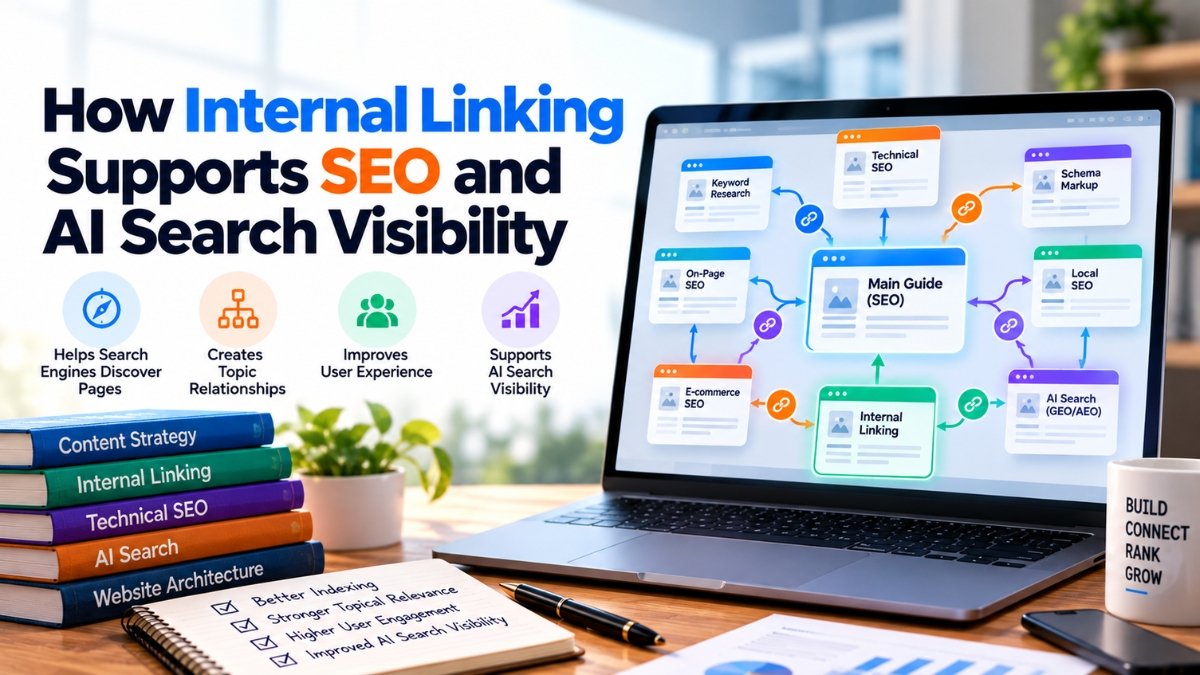
    Imagine a website has the following pages:

    • SEO Guide
    • Technical SEO
    • Schema Markup
    • Internal Linking
    • E-commerce SEO

    Linking these pages contextually helps establish that they belong to a broader SEO topic.

    This creates a more organised information architecture.

    3. Helps Users Discover More Content

    SEO isn’t only about search engines.

    Suppose someone reads an article about keyword research and sees a relevant link to a detailed guide about search intent.

    They may click the link because it provides the next piece of information they need.

    This can increase engagement and help users explore the website naturally.

    The best internal links feel helpful rather than forced.

    4. Use Descriptive Anchor Text

    Anchor text is the clickable text used for a link.

    Compare:

    “Click here”

    with:

    “Shopify technical SEO checklist”

    The second option provides much more context.

    Descriptive anchor text helps users understand where the link leads and provides search engines with contextual information.

    However, avoid repeating the exact same keyword unnaturally across every link.

    Write anchor text for humans first.

    5. Link From Relevant Pages

    Relevance is more important than simply adding as many links as possible.

    For example, an article about Google Merchant Center could naturally link to an article about product-feed optimization.

    But linking randomly to an unrelated topic can make the content structure confusing.

    Ask yourself:

    “Would this link genuinely help someone reading this page?”

    If the answer is yes, it may be a useful internal link.

    6. Create Content Hubs

    Content hubs are an effective way to organise related information.

    For example, a website targeting digital marketing could have a main SEO guide supported by articles about:

    • Keyword research
    • Technical SEO
    • On-page SEO
    • Off-page SEO
    • Local SEO
    • Schema
    • AEO
    • GEO

    The main guide can link to supporting articles, while supporting articles can link back to the main guide where appropriate.

    This creates a connected content ecosystem.

    7. Don’t Ignore Older Content

    One common problem is that marketers add internal links only when publishing new articles.

    Older articles can become isolated over time.

    Regularly audit existing content and identify opportunities to connect newer and older pages.

    For example, if you publish an article about AI search today, you might find that several older SEO articles could naturally link to it.

    This can help distribute visibility across your website.

    Internal Linking and AI Search

    AI-powered search systems need to understand relationships between pieces of information.

    A well-organised website provides clearer context.

    Internal links can help reinforce which pages discuss related subjects and how those subjects fit together.

    This doesn’t mean that adding internal links automatically makes a page appear in an AI-generated answer.

    There are many factors involved.

    But a clear information architecture makes your website easier for both users and search systems to navigate and understand.

    Common Internal Linking Mistakes

    Avoid these problems:

    Too many links:
    Adding dozens of links to a short article can reduce usability.

    Irrelevant links:
    Links should have a logical relationship with the surrounding content.

    Generic anchor text:
    “Read more” provides less context than descriptive anchor text.

    Orphan pages:
    Important pages should not be isolated from the rest of the website.

    Ignoring commercial pages:
    Blog content can sometimes provide useful contextual links to relevant product or service pages.

    How to Build an Internal Linking Strategy

    Start with your most important pages.

    Identify:

    1. Your main service or product pages
    2. Your strongest informational pages
    3. Your supporting content
    4. Relevant relationships between them

    Then create contextual links between related pages.

    You can also use tools such as Screaming Frog to identify pages with few or no internal links.

    Google Search Console can then help you understand which pages are receiving search visibility.

    Conclusion

    Internal linking doesn’t require a large budget or complicated technology.

    It requires planning.

    A website should not feel like a collection of disconnected pages. It should feel like a structured library where every important piece of information has a logical place.

    When internal links are relevant, descriptive, and useful, they improve navigation while helping search engines understand the site’s structure.

    As search continues to evolve toward more AI-powered experiences, creating a clear and connected website architecture is becoming an increasingly important part of modern SEO.
  • ROAS vs ROI: Which Metric Should Digital Marketers Track?

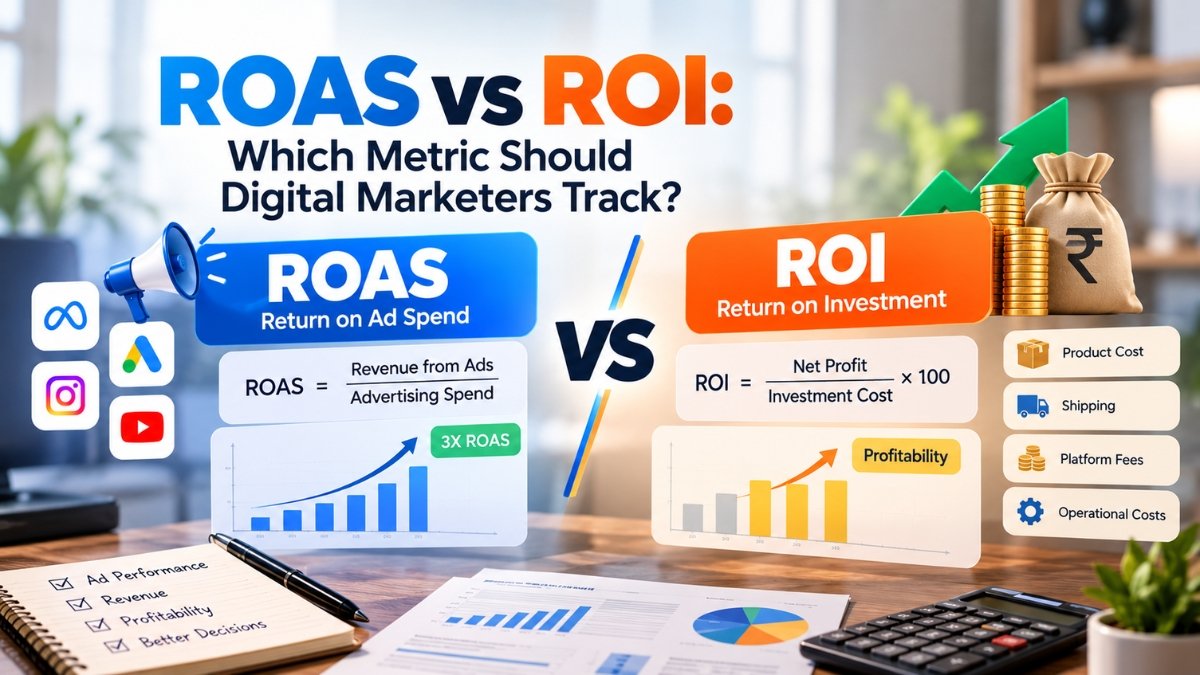
    ROAS vs ROI: Which Metric Should Digital Marketers Track?

    Digital advertising produces a lot of numbers.

    Impressions, clicks, CTR, CPC, conversions, revenue, ROAS, and ROI are just some of the metrics marketers see every day.

    Among these, ROAS and ROI are two of the most commonly discussed financial metrics. They are related, but they answer different questions.

    Understanding the difference can help businesses evaluate advertising performance more accurately.

    What Is ROAS?

    ROAS stands for Return on Ad Spend.

    It measures how much revenue is generated for every amount spent directly on advertising.

    The basic formula is:

    ROAS = Revenue from Ads ÷ Advertising Spend

    For example, suppose a business spends ₹10,000 on Meta Ads and generates ₹30,000 in attributed sales.

    ROAS would be:

    ₹30,000 ÷ ₹10,000 = 3X

    This means the campaign generated ₹3 in attributed revenue for every ₹1 spent on advertising.

    What Is ROI?

    ROI stands for Return on Investment.

    Unlike ROAS, ROI considers the broader costs and returns associated with an investment.

    A simplified formula is:

    ROI = (Net Profit ÷ Investment Cost) × 100

    For example, if a business spends ₹10,000 on advertising but has another ₹12,000 in product, shipping, platform, and operational costs, simply generating ₹30,000 in revenue doesn’t mean the business made ₹20,000 in profit.

    The actual profitability depends on total costs.

    Why ROAS Can Be Misleading

    ROAS can look attractive even when a campaign isn’t profitable.

    Imagine:

    Ad spend: ₹20,000
    Revenue: ₹60,000
    ROAS: 3X

    At first glance, that sounds positive.

    But suppose the business has:

    Product cost: ₹25,000
    Shipping: ₹5,000
    Platform fees: ₹6,000
    Other costs: ₹8,000

    The actual profit picture is very different.

    This is why marketers shouldn’t treat a specific ROAS number as universally good or bad.

    Profit margins vary significantly between businesses.

    Why ROI Matters for Business Decisions

    ROI provides a broader financial perspective.

    A marketing campaign can have strong revenue but weak profitability.

    For example, discount-heavy campaigns may increase sales volume while reducing margins.

    ROI helps businesses ask a more important question:

    “Did this investment actually create profit?”

    This is particularly useful when comparing different marketing channels or larger business investments.

    When Should Marketers Track ROAS?

    ROAS is particularly useful for monitoring paid advertising performance.

    Marketers can use it to compare:

    • Campaigns
    • Ad sets
    • Creatives
    • Products
    • Audiences
    • Advertising platforms

    For example, if one campaign generates significantly more attributed revenue per rupee of ad spend, marketers can investigate why.

    However, attribution should always be considered.

    Different platforms may report conversions differently, so numbers from Meta, Google Ads, analytics platforms, and the actual store may not match.

    When Should Businesses Focus on ROI?

    ROI becomes more useful when making broader business decisions.

    For example:

    Should the company invest more in paid advertising?

    Should it increase influencer marketing?

    Should it invest in SEO?

    Should it hire an additional marketing employee?

    These decisions involve costs beyond advertising spend.

    ROI can help provide a broader financial view.

    ROAS and ROI Can Work Together

    The real question isn’t necessarily whether a business should use ROAS or ROI.

    In many cases, it should use both.

    ROAS can answer:

    “How efficiently are we turning advertising spend into attributed revenue?”

    ROI can answer:

    “Is the overall investment generating a worthwhile financial return?”

    These are different questions.

    Other Metrics Marketers Should Track

    Neither ROAS nor ROI should be viewed in isolation.

    Depending on the business model, marketers should also monitor:

    • Conversion rate
    • Customer acquisition cost
    • Average order value
    • Customer lifetime value
    • Gross margin
    • Cost per purchase
    • Lead quality
    • Repeat purchase rate

    For lead-generation campaigns, ROAS may not immediately capture the full value of a lead because the eventual sale can happen later.

    In such cases, marketers may need to track lead-to-customer conversion and customer acquisition cost.

    Example: E-commerce Campaign

    Consider an online store that spends ₹50,000 on advertising.

    The campaign generates ₹2,00,000 in attributed sales.

    ROAS:

    ₹2,00,000 ÷ ₹50,000 = 4X

    That tells us the campaign generated ₹4 in attributed revenue for every ₹1 spent.

    But suppose the business spent ₹1,20,000 on product costs, ₹15,000 on shipping and fees, and ₹10,000 on other costs.

    The final profitability will be much lower than the ROAS number suggests.

    This example shows why revenue efficiency and business profitability should be analysed separately.

    Don’t Chase a Number Blindly

    One common mistake is setting an arbitrary ROAS target without understanding the business’s margins.

    A business with high margins may be able to operate with a lower ROAS than a business with very thin margins.

    The right target depends on:

    • Gross margin
    • Operating costs
    • Average order value
    • Customer lifetime value
    • Repeat purchases
    • Business objectives

    Instead of asking whether “4X ROAS is good,” ask whether the campaign is generating enough contribution to support profitable growth.

    Conclusion

    ROAS and ROI are both valuable, but they measure different things.

    ROAS focuses specifically on advertising efficiency, while ROI looks at the broader financial return of an investment.

    For digital marketers, ROAS can be a useful day-to-day campaign metric. For business owners and decision-makers, ROI provides a wider view of financial performance.

    The strongest measurement approach combines both with metrics such as CAC, conversion rate, margin, and customer lifetime value.

    Ultimately, the goal of marketing isn’t simply to generate clicks or revenue.

    It’s to create sustainable business value.

  • How to Optimize Content for AI Search Engines Like ChatGPT, Gemini & Perplexity

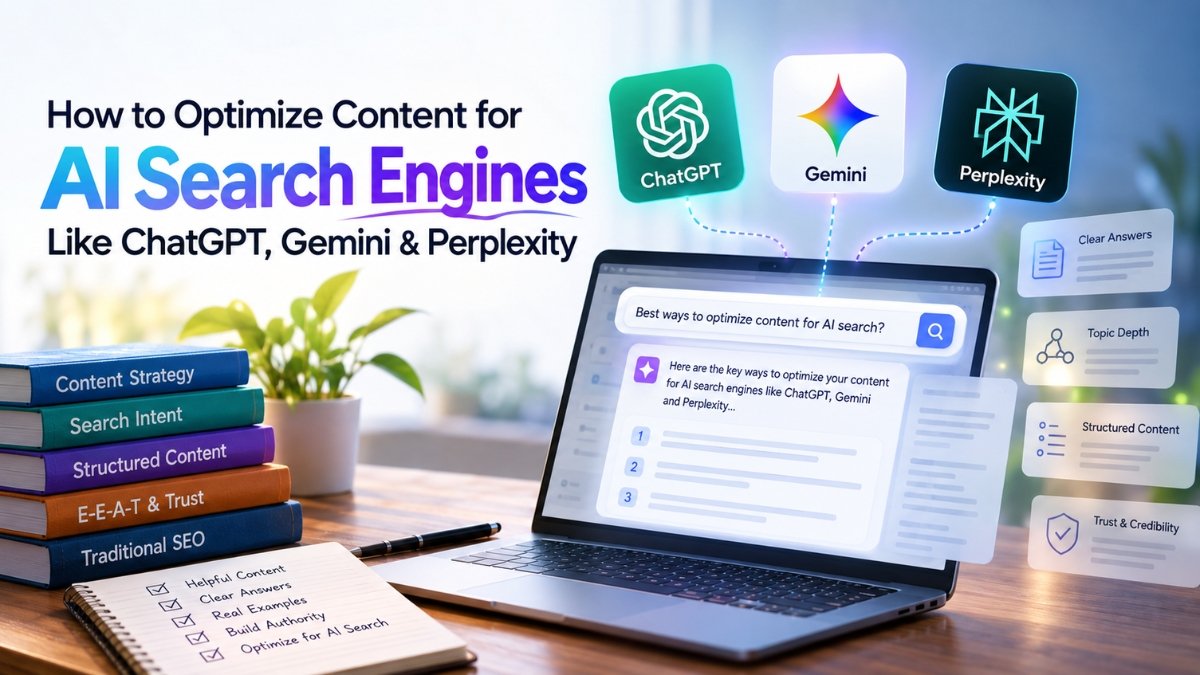
    How to Optimize Content for AI Search Engines Like ChatGPT, Gemini & Perplexity

    Search is changing faster than most marketers expected. People are no longer relying only on Google to find information. They are increasingly asking AI platforms such as ChatGPT, Gemini, and Perplexity to explain a topic, compare products, summarize information, and recommend solutions.

    For businesses, this creates a new challenge: ranking on a traditional search engine is no longer the only goal. Your content also needs to be useful and understandable enough for AI systems to recognize, summarize, and potentially mention.

    This is where AI search optimization comes in.

    What Is AI Search Optimization?

    AI search optimization is the process of creating and structuring content so AI-powered search and answer engines can better understand it and use it when responding to user queries.

    Traditional SEO focuses heavily on improving visibility in search engine results pages. AI search adds another layer. Instead of simply trying to appear as a blue link, brands need to make their information clear, trustworthy, relevant, and easy for AI systems to interpret.

    The fundamentals of good SEO still matter. However, the way users discover information is becoming more conversational.

    For example, instead of searching:

    “Best CRM software”

    a user might ask:

    “What CRM should a small business use if it has a limited sales team and wants WhatsApp integration?”

    AI platforms can understand the context behind that question and generate a direct response.

    1. Focus on Search Intent, Not Just Keywords

    One of the biggest mistakes in content marketing is creating an article around a keyword without understanding why someone is searching for it.

    AI search makes intent even more important.

    Before creating content, ask:

    • What problem is the user trying to solve?
    • What information do they actually need?
    • What follow-up questions might they have?
    • What practical decision are they trying to make?

    Instead of creating a generic article targeting “Shopify SEO,” for example, create useful content around specific problems such as improving product-page visibility, fixing duplicate URLs, optimizing collection pages, or improving technical SEO.

    The more closely your content answers the real question, the more useful it becomes.

    2. Write Clear and Direct Answers

    AI systems need to understand your content quickly.

    Avoid hiding the main answer underneath several paragraphs of unnecessary introduction.

    If you’re answering a question, provide a concise answer first and then explain it.

    For example:

    What is GEO?

    Generative Engine Optimization (GEO) is the practice of improving content so that it has a better chance of being understood and referenced by AI-powered search and answer engines.

    You can then expand on the definition, strategies, examples, and limitations.

    This structure benefits users as well because readers often want the answer quickly.

    3. Build Topic Depth

    One article rarely establishes strong authority on an entire subject.

    Instead, build a collection of related content.

    For example, if your website focuses on SEO, you could publish articles covering:

    • Technical SEO
    • Internal linking
    • Schema markup
    • Keyword research
    • AEO
    • GEO
    • AI search
    • Local SEO
    • E-commerce SEO
    • Content optimization

    These articles can be connected through internal links.

    This creates a stronger topical structure and helps search engines understand the areas your website covers.

    4. Use Structured Content

    Well-structured content is easier for both humans and machines to understand.

    Use:

    • Descriptive headings
    • Short paragraphs
    • Bullet points where appropriate
    • Tables for comparisons
    • Step-by-step explanations
    • FAQs
    • Definitions
    • Examples

    However, don’t structure an article simply to satisfy an algorithm.

    The structure should make the information easier to consume.

    5. Add First-Hand Experience

    AI can generate generic information very easily. That means original experience can become an important differentiator.

    Instead of saying:

    “Internal linking improves SEO.”

    Explain how it can be implemented.

    For example, describe how a website can identify important pages, find relevant supporting articles, create contextual links, and monitor changes after implementation.

    Case studies, original observations, screenshots, experiments, and practical examples can make content more valuable.

    6. Strengthen Trust and Credibility

    AI search platforms need reliable information to produce useful answers.

    Businesses should therefore make it clear who created the content and why that person or organization is qualified to discuss the topic.

    Consider including:

    • Author information
    • Updated dates
    • Sources where appropriate
    • Original research
    • Industry experience
    • Accurate statistics
    • References to authoritative information

    Don’t publish claims simply because they sound impressive.

    Accuracy matters more than keyword density.

    7. Optimize for Conversational Queries

    AI search is naturally conversational.

    People may ask questions using complete sentences rather than short keywords.

    For example:

    “How can I improve my Shopify store’s organic traffic without increasing my ad budget?”

    Content that addresses these natural questions can cover more variations of the same search intent.

    This doesn’t mean filling an article with dozens of question-based keywords. Instead, understand the conversations your target audience is having and answer them naturally.

    8. Don’t Forget Traditional SEO

    AI search optimization does not mean traditional SEO is dead.

    Technical SEO, crawlability, indexing, internal linking, quality backlinks, page experience, structured data, and useful content still matter.

    Think of AI search optimization as an extension of a broader search strategy rather than a replacement for SEO.

    A technically poor website with unclear content is unlikely to become highly visible simply because it mentions AI-related terms.

    9. Create Content People Would Actually Want to Reference

    One useful question for marketers is:

    “If someone wanted to explain this topic to another person, would they find my article useful?”

    If the answer is yes, you’re moving in the right direction.

    Create content that contains useful definitions, practical steps, comparisons, examples, original insights, and clear explanations.

    The goal isn’t to write content for machines. The goal is to create information that machines can understand because humans genuinely find it useful.

    Conclusion

    AI search is changing how people discover information, but the fundamentals remain surprisingly familiar.

    Businesses still need accurate information, useful content, technical foundations, strong authority, and a clear understanding of their audience.

    The difference is that content now needs to work across multiple search experiences.

    Instead of asking only, “How do I rank this page?”

    marketers should also ask:

    “Can a search engine understand this?”

    “Can an AI system identify the key information?”

    “And would the answer actually help someone?”

    That mindset can help businesses prepare for the next stage of search.


  • How Flipkart Product Ads Actually Work (And Why Most Sellers Eventually Start Using Them)

    How Flipkart Product Ads Actually Work (And Why Most Sellers Eventually Start Using Them)

    Even products that rank well organically can lose visibility if competitors start advertising aggressively.

    I’ve seen brands that were comfortably sitting near the top of search results suddenly face increased competition simply because other sellers were investing more heavily in sponsored placements.

    In those situations, advertising becomes less about growth and more about protecting market share.

    Sometimes, maintaining visibility is just as important as gaining it.

    Are Flipkart Product Ads Worth the Investment?

    The honest answer is that it depends on what you’re advertising.

    A strong product with competitive pricing and a well-optimized listing often benefits significantly from additional visibility.

    A weak listing usually doesn’t.

    Ads can bring visitors to your product page, but they can’t fix poor images, unrealistic pricing, or negative reviews.

    That’s why the most successful sellers don’t treat advertising as a magic solution.

    They use it as one part of a larger strategy that includes listing optimization, pricing, inventory management, and customer satisfaction.

    Final Thoughts

    Flipkart Product Ads aren’t guaranteed to make every seller profitable.

    What they do offer is an opportunity to get in front of customers who may never have discovered your product otherwise.

    For new sellers, that visibility can be the difference between getting noticed and getting ignored.

    For established sellers, it can help maintain momentum in competitive markets.

    The sellers who get the best results are usually the ones who view advertising as a learning tool rather than a shortcut. They pay attention to the data, make adjustments when necessary, and understand that long-term growth rarely happens overnight.

    That’s ultimately why Flipkart Product Ads continue to be such an important part of selling on the platform today.

  • Types of Amazon Ads and How They Actually Work

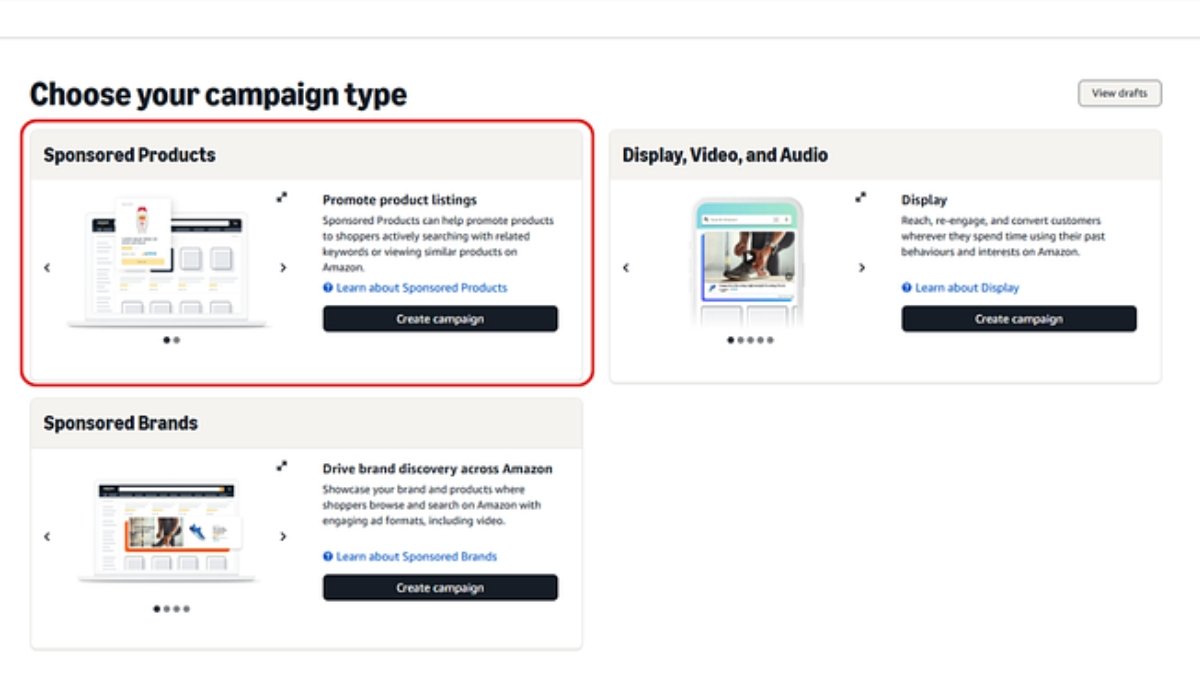
    When you first log into Amazon Ads and see the campaign creation screen, it looks simple enough.

    Three options. How complicated can it be?

    Pretty complicated, actually. I spent months running the wrong ad type for what I was trying to do. Cost me a lot of money and a lot of frustration before I figured out which one to use and when.

    Let me save you that time.

    The Three Campaign Types Amazon Gives You

    Amazon currently offers three main campaign types from the seller dashboard:

    • Sponsored Products
    • Sponsored Brands
    • Display, Video, and Audio

    Each one does something different. Each one costs differently. And each one is suited for a different stage of your business.

    Here’s what I’ve learned about each of them.

    Sponsored Products, Start Here. Always.

    This is the one highlighted in red on Amazon’s own campaign selection screen. There’s a reason for that.

    Sponsored Products are the ads that show up directly inside search results. They look almost exactly like organic listings, same image, same title, same price, same star rating. The only difference is a tiny “Sponsored” label.

    Buyers don’t really notice that label. They just see a relevant product and they click.

    How it works is straightforward. You pick a product. You choose keywords, or let Amazon pick them automatically. You set a bid. When someone searches for those keywords, your product competes in a real-time auction for a top spot. You only pay when someone actually clicks.

    Why I always tell new sellers to start here: the feedback loop is tight. You can see exactly which search terms triggered your ad, which ones converted, and which ones wasted money. The data is clean because it’s one product at a time.

    I ran Sponsored Products for my first six months before I touched anything else. Learned more about my customers from those campaigns than from anything else I tried.

    If you’re new, don’t skip this and jump straight to the fancier options. Start here. Learn your keywords. Understand your conversion rate. Then move on.

    Sponsored Brands, Once You Have Something to Show

    Sponsored Brands are the banner-style ads you see at the very top of Amazon search results. The big ones with your logo, a custom headline, and usually two or three products displayed together.

    They’re more visible than Sponsored Products. More brand-forward. And they cost more, too.

    Amazon describes it as “driving brand discovery”, which is accurate. These ads are less about pushing a single product and more about putting your brand name in front of people who might not have heard of you yet.

    Here’s where most new sellers go wrong with this one. They set up Sponsored Brands before they’re ready. Before they have a strong brand presence. Before they have multiple solid products. Before they have enough reviews.

    I made that mistake. Ran Sponsored Brands with two products, a generic logo, and no real brand story. Spent decent money. Got clicks. Very few conversions.

    The truth is, Sponsored Brands work best when buyers actually recognize or trust your brand. They work for sellers who’ve been around a while, have a lineup of products, and want to own the top of the page for their category.

    If you’re just starting out, wait on this one. Build your catalog and your reviews first. Then come back to it.

    Display, Video, and Audio: The Advanced Stuff

    This one is different from the other two in a fundamental way.

    Sponsored Products and Sponsored Brands show your ads to people who are actively searching on Amazon. They have intent. They’re already looking for something.

    Display ads reach people everywhere else, other websites, apps, streaming services, and even back on Amazon as they browse. You’re targeting people based on their past behavior and interests, not what they’re actively searching for right now.

    Amazon calls it “re-engage and convert customers wherever they spend time.” That’s a polite way of saying: these ads follow people around the internet.

    Video ads play before or during Amazon streaming content. Audio ads play on Alexa devices and Amazon Music. These are awareness tools, not direct-response tools.

    Cost-wise, this is the most expensive category. And the ROI is harder to measure because you’re not catching someone mid-search, you’re trying to plant a seed.

    Honest opinion? Unless you’re running a well-established brand with a serious marketing budget, these aren’t where you should be spending money early on. The sellers I’ve seen use Display well are either large brands or sellers with very specific retargeting goals, like showing ads to people who viewed their product but didn’t buy.

    For most sellers reading this, it can wait.

    So Which One Should You Use?

    Here’s how I’d think about it based on where you are:

    Just launched or under 50 reviews: Sponsored Products only. Auto campaign first, then manual once you have keyword data. Keep it simple.

    Established product, growing catalog: Add Sponsored Brands to start building brand recognition. Keep your Sponsored Products campaigns running alongside.

    Strong brand, multiple products, larger budget: Now you can experiment with Display, especially retargeting people who visited your listings but didn’t convert.

    The mistake most sellers make is trying to run everything at once before they have the budget or the data to do it right. Amazon’s ad platform rewards patience and optimization. Not spray-and-pray.

    One Last Thing

    The campaign type is just the starting point.

    What actually determines whether your ads make money is what happens after you launch, how you read the data, which keywords you cut, how you adjust bids, whether your listing converts the traffic you’re buying.

    A bad listing with a great campaign type still loses money.

    A great listing with even a basic Sponsored Products campaign can do very well.

    Get your listing right first. Then run the ads. Then learn from the numbers.

    That’s really the whole game.

  • How Flipkart Ads Can Help New Products Get Discovered

    How Flipkart Ads Can Help New Products Get Discovered

    Launching a new product on Flipkart feels exciting until you realize that nobody can find it.

    You’ve done the work. You’ve written a decent title, uploaded clear images, and set a competitive price. But your product is sitting on page 8 of the search results, and organic traffic is basically zero. Sound familiar?

    This is the reality for most new listings on Flipkart. The platform has millions of products, and without some kind of push, even good products stay invisible. That’s where Flipkart Ads come in.

    I’m not talking about burning your budget on ads that don’t work. I’m talking about using Flipkart’s advertising tools the right way, to give your new product the initial visibility it needs to start building momentum.

    Here’s how it actually works.

    The Discovery Problem Every New Seller Faces

    Flipkart’s search algorithm, like most marketplace algorithms, rewards products that already have sales, reviews, and clicks. It’s a bit of a chicken-and-egg problem; you need sales to rank, but you need to rank to get sales.

    New products have no history. No reviews. No sales data. So the algorithm doesn’t know where to place them, and it plays it safe by ranking them low.

    Flipkart Ads solves this by giving your product placement that it hasn’t earned organically yet. You’re essentially paying to skip the line, not permanently, but long enough to get the ball rolling.

    What Flipkart Ads Actually Offer

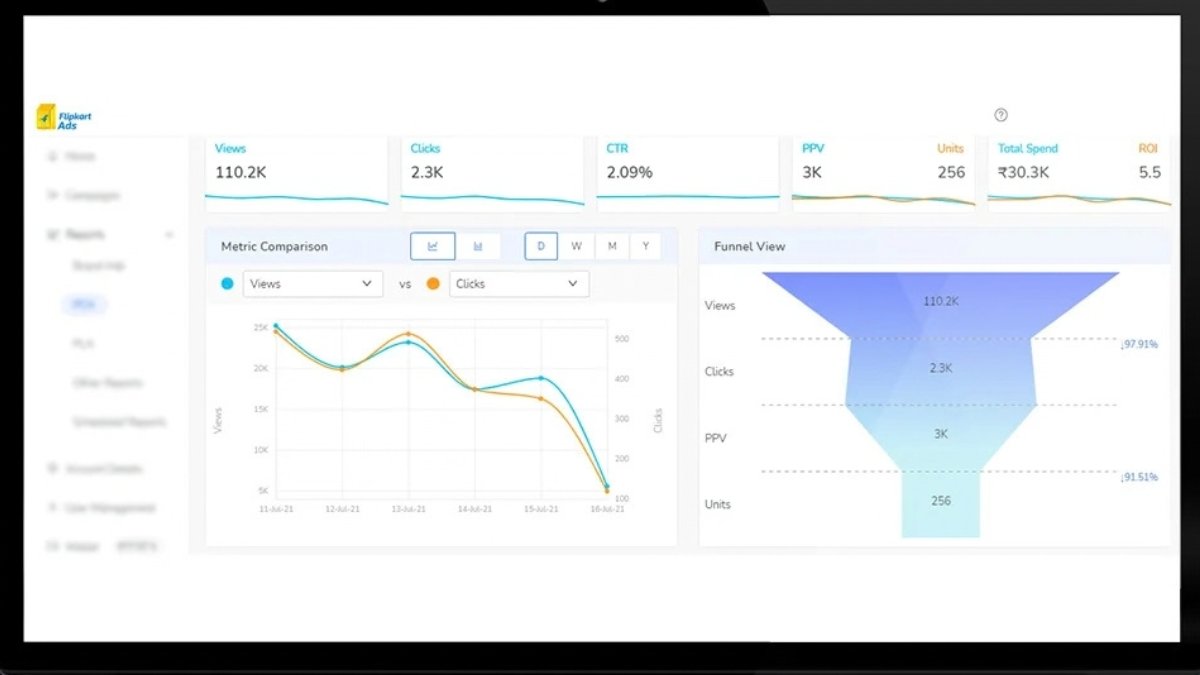
    Flipkart’s advertising platform, called Flipkart Ads (part of their seller hub), has a few different ad formats, but the most useful one for new products is Product Listing Ads (PLAs).

    These are the sponsored listings that appear at the top of search results and category pages. They look almost like organic results, which means buyers don’t scroll past them the way they might ignore a flashy banner ad.

    When someone searches for “wireless earphones under 1500” and your product appears right at the top with a “Sponsored” tag, that’s a PLA doing its job.

    There are also display ads for broader reach, but for a new seller with a limited budget, PLAs are where you should focus first.

    Why Ads Work Especially Well for New Products

    Here’s something that surprises a lot of new sellers: Flipkart Ads don’t just bring traffic. They also feed the algorithm.

    When your sponsored product gets clicks and, more importantly, conversions, Flipkart starts treating it differently. The platform sees that real buyers are interested. That data slowly improves your organic ranking too.

    Think of it this way: your ad spend in the first 30–60 days is partly buying visibility and partly buying algorithmic trust. Both matter.

    Without that initial push, new products can sit dormant for months. With ads, you compress that timeline significantly.

    How to Set Up Your First Flipkart Ad Campaign (Without Overthinking It)

    The Flipkart Seller Hub makes it reasonably straightforward to get started. Here’s a simple approach that works:

    Step 1: Pick one product to start with. Don’t try to advertise your entire catalog right away. Choose the product you’re most confident about, best images, best price, best chance of converting.

    Step 2: Start with auto-targeting. Flipkart will match your ad to relevant search queries automatically. It’s not perfect, but it gives you data quickly. Run this for 2–3 weeks and watch which search terms are driving clicks.

    Step 3: Set a conservative daily budget. You don’t need to spend thousands right away. Even ₹200–₹500 per day can generate useful data and some early sales for a new product in a niche category. Scale up once you see what’s working.

    Step 4: Check your Search Term Report. This is where the real learning happens. You’ll see which terms buyers are using, which ones are converting, and which ones are wasting your money. Use this to build a smarter manual campaign over time.

    Step 5: Gradually move to manual targeting. Once you know your converting keywords, switch to manual bidding on those specific terms. This gives you more control and usually improves your return on ad spend.

    The Listing Has to Do Its Job

    Ads bring people to your product page. But if the page doesn’t convert, you’re just paying for clicks that go nowhere.

    Before you go heavy on ad spend, make sure your listing is ready to close the deal:

    • Main image: Clean, white background, product clearly visible. This is the first thing buyers see in search results, it determines whether they click or scroll past.
    • Price: If your competitors are at ₹999 and you’re at ₹1,499 with zero reviews, ads alone won’t fix that gap.
    • Reviews: Even 5–10 solid reviews make a meaningful difference in conversion. Consider using Flipkart’s early reviewer programs or fulfilment services to get initial traction.

    A good ad campaign with a weak listing is money wasted. Fix the listing first, then run the ads.

    What New Sellers Get Wrong About Flipkart Ads

    A few mistakes I see come up repeatedly:

    Expecting immediate ROI. The first few weeks of advertising a new product are mostly about data collection and visibility. Your ACoS (Advertising Cost of Sale) will likely be high early on. That’s okay. Think of it as a launch investment, not a loss.

    Running too many products at once. When you spread your budget thin across 10 products, none of them gets enough spend to generate meaningful data. Pick 1–2 and actually learn from them.

    Stopping ads too soon. Some sellers run ads for 10 days, don’t see immediate returns, and quit. The algorithm needs time to gather data and the product needs time to build even a few reviews. Give it at least 4–6 weeks before making big decisions.

    Ignoring the Search Term Report. This is the most valuable data Flipkart gives you. If you’re not reading it regularly, you’re advertising blind.

    When Does It Start Working?

    Honestly? It varies. Category, competition, pricing, and listing quality all play a role.

    But in most cases, a well-set-up Flipkart Ads campaign for a new product starts showing real traction somewhere between week 3 and week 8. You’ll notice your organic impressions starting to climb alongside your ad performance. That’s the signal that the algorithm is starting to take your product seriously.

    From there, the goal is to gradually reduce your dependency on paid traffic as organic traffic grows. You’ll never fully turn off ads; the top sellers on Flipkart never do, but over time, your cost per sale goes down, and your margins improve.

    Final Thought

    New products don’t fail on Flipkart because they’re bad products. Most of the time, they fail because nobody ever saw them.

    Flipkart Ads are the most direct tool you have to fix that problem. Used correctly, they don’t just bring traffic; they trigger the discovery cycle that gets your product seen, clicked, reviewed, and ranked.

    Start small. Learn from the data. Improve your listing. Then scale.

    That’s the unglamorous truth about getting a new product discovered on Flipkart, and it works.

  • Why I Recommend Amazon Single Product Ads to New Sellers

    Why I Recommend Amazon Single Product Ads to New Sellers

    When I first started selling on Amazon, I did what most new sellers do: I threw money at Sponsored Brands, tried auto campaigns, and basically watched my ad budget disappear without knowing why.

    Then someone told me to slow down and start with Sponsored Products (Single Product Ads). That one change made everything click.

    If you’re a new seller trying to figure out Amazon PPC, here’s why I always recommend starting with single-product ads before anything else.

    What Are Single Product Ads, Exactly?

    Sponsored Products, what most people call “single product ads”, are the ads that show up right in Amazon’s search results and on product detail pages. They look almost identical to organic listings. No big banner. No flashy creative. Just your product, your price, and your reviews showing up where buyers are already looking.

    That simplicity is the whole point.

    Reason 1: You Learn Fast Without Burning Cash

    When you run ads for one product at a time, your data is clean. You know exactly which keyword brought a click. You know exactly which search term converted. You’re not trying to figure out whether it was Product A or Product B that caused the spike.

    For new sellers, clarity beats scale every time.

    I’ve seen people launch with 1 product in a broad campaign and spend three months trying to make sense of the numbers. Single product ads give you a tight feedback loop; you spend a little, you learn a lot, and you adjust fast.

    Reason 2: The Setup Is Genuinely Simple

    You don’t need an agency. You don’t need a massive budget. You pick your product, write a bid, choose your keywords (or let Amazon auto-suggest them), and you’re live.

    The learning curve on Sponsored Brands or DSP can be steep when you’re also figuring out inventory, pricing, and reviews at the same time. Sponsored Products lets you focus.

    Start with an automatic campaign first. Let Amazon find the search terms people are using to find products like yours. After two or three weeks, you’ll have real data to build a manual campaign from. That’s the most practical thing I can tell any new seller.

    Reason 3: Your Budget Goes Further

    Single product ads work on a cost-per-click model. You only pay when someone actually clicks your listing. And because you’re targeting specific keywords (especially long-tail ones), your clicks tend to come from people who actually want what you’re selling.

    Broad awareness campaigns are expensive when you’re small. Single product ads let you be surgical, spend where intent is highest, skip where it’s not.

    Even with ₹500–₹1000 a day, a well-set-up single product ad campaign can generate meaningful results if your listing is solid.

    Reason 4: It Teaches You How Amazon’s Algorithm Thinks

    Here’s something most people don’t tell you: running Sponsored Products ads also helps your organic ranking.

    When your ad drives sales for a specific keyword, Amazon notices. Your organic position for that keyword slowly improves. Over time, you can reduce ad spend on terms where you’re ranking organically and redirect that money to new keywords.

    It’s not an overnight thing. But for new sellers building momentum, this compounding effect is real and valuable.

    Reason 5: You Can Start Small and Scale With Confidence

    I’ve watched new sellers overspend on influencer campaigns or Sponsored Brand Videos before they even know what their conversion rate is. That’s a tough spot to be in.

    Single product ads let you validate first. Is this product converting? Is this keyword profitable? Can I win this category at my current price point?

    Get those answers with small, focused campaigns. Then scale what’s working. You’ll spend smarter and sleep better.

    One Thing to Keep in Mind

    Single product ads are only as good as the listing behind them. If your main image is weak, your title is confusing, or you have two reviews at 3 stars, the ad will bring traffic, but it won’t convert.

    Before you go heavy on spending, make sure your listing is ready. Strong images. Keyword-optimized title and bullet points. At least 10–15 reviews, if possible. That’s what turns clicks into sales.

    Final Thought

    Amazon advertising can feel overwhelming when you’re starting out. There are too many campaign types, too many settings, and too many people online telling you to do opposite things.

    My honest advice: ignore most of that noise early on. Start with one product. Run one Sponsored Products campaign. Watch what happens. Learn from it.

    Single product ads aren’t glamorous. But they work, and they’ll teach you more about your business in 30 days than most other strategies will in six months.

    That’s why I recommend them to every new seller I talk to.