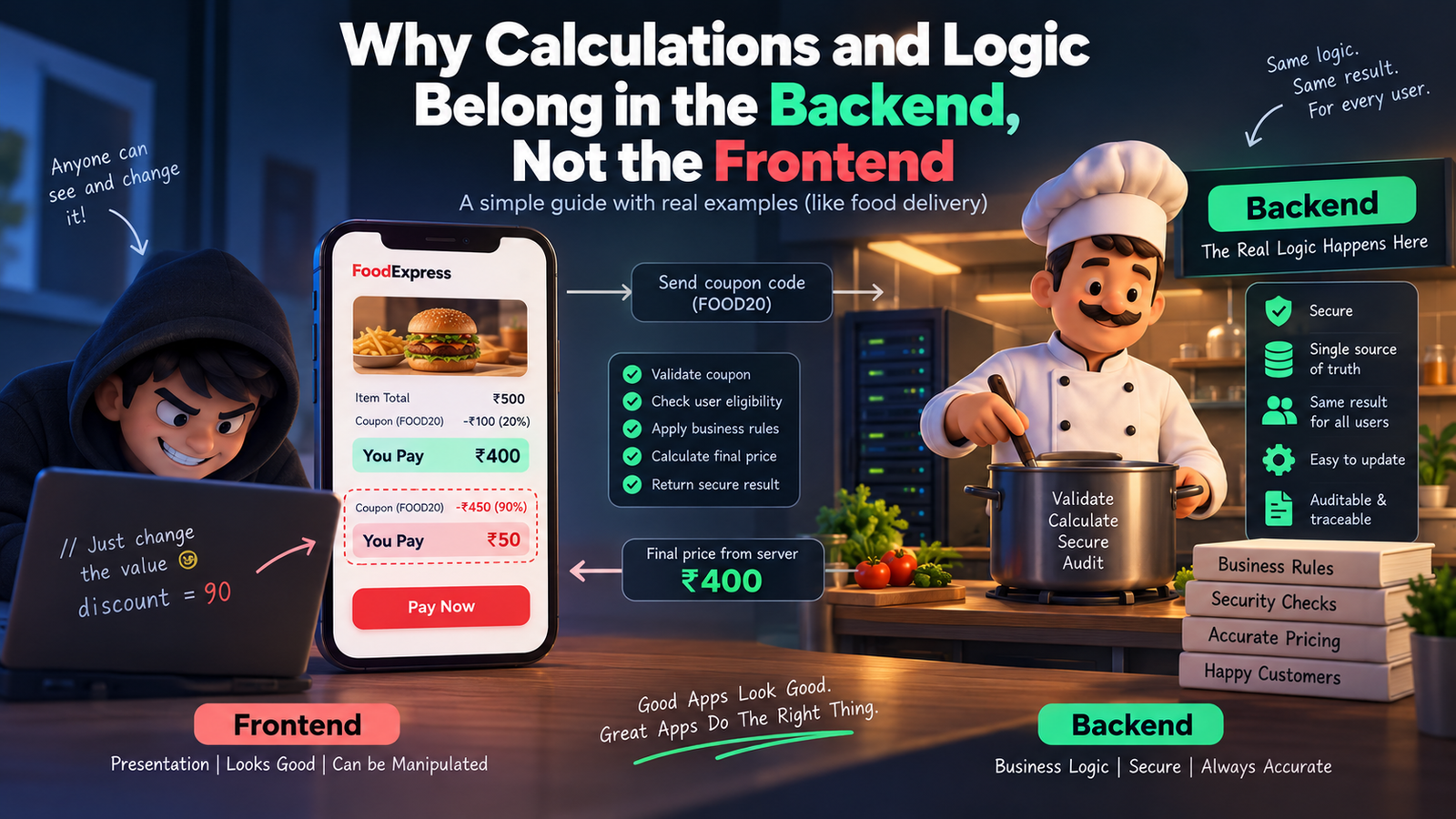
Picture this. You’re building a food delivery app. A customer orders food worth ₹500, adds a coupon for 20% off, and the frontend proudly shows “You pay ₹400.” Cool, right?
Except… what if the customer opens the browser console, changes that 20% to 90%, and hits pay? If your discount math lives only in the frontend, you just lost ₹450 on that order. This one scenario explains almost everything about why calculations and logic belong on the backend, not the frontend.
Let’s break this down in the friendliest way possible.
First, What Do We Even Mean by “Frontend” and “Backend”?
Think of a restaurant. The frontend is the waiter — the person you see, the menu you touch, the smile you get when your food arrives. The backend is the kitchen — where the actual cooking happens, where the chef decides how much salt goes in, how long to fry something, and whether an ingredient has gone bad.
You never let a customer walk into the kitchen and decide their own recipe. Similarly, you never let the frontend decide your app’s real logic. The frontend’s job is to display things beautifully. The backend’s job is to decide things correctly.
Why Frontend Logic is Risky (The Disadvantages)
1. Anyone can see and change it. Everything running in the browser — your JavaScript, your calculations, your “if-else” rules — is visible to anyone who opens Developer Tools. It’s like writing your restaurant’s secret recipe on a whiteboard facing the customers. A curious (or malicious) user can tweak prices, unlock premium features, or bypass validations in seconds.
2. It’s easy to manipulate. Since the code and data both sit in the user’s browser, a smart user can literally rewrite your app’s math using browser console commands. Discounts, wallet balances, loan EMI calculations — all of it becomes editable by whoever’s using the app.
3. Different devices, different results. Frontend logic runs on the user’s device — phone, laptop, tablet — each with its own browser, its own quirks, sometimes even outdated app versions. If your logic lives there, two users could get two different answers to the same calculation, depending on their device.
4. No single source of truth. If ten different frontend clients (web, Android, iOS) all calculate the same thing independently, you’ll eventually get ten slightly different answers. Bugs creep in. Trust breaks down.
5. Sensitive data gets exposed. To calculate something on the frontend, you often need to send it all the raw data first — prices, taxes, internal rules, maybe even other users’ info. That’s a data leak waiting to happen.
Why Backend Logic Wins (The Advantages)
1. It’s a locked kitchen. The backend runs on your server, completely out of the user’s reach. They can inspect the frontend all they want, but they can never see or touch the actual logic running behind the API.
2. One source of truth. Whether the request comes from a website, an Android app, or an iOS app, the backend calculates the answer the same way, every single time. Consistency guaranteed.
3. Real security checks happen here. Your backend can verify: Is this coupon still valid? Has this user already used it? Does this account actually have enough balance? These are questions only a trusted, protected environment should answer.
4. Easy to update without breaking things. Change a tax rule or a pricing formula on the backend, and it instantly applies everywhere — no need to update and re-release five different apps.
5. Auditable and traceable. Backend calculations can be logged, monitored, and audited. If something goes wrong, you can trace exactly what happened. Try doing that with logic running invisibly inside someone’s browser.
Real-Time Example: The Coupon Discount
Let’s compare both approaches with our food delivery example.
Frontend-only approach: The app calculates: finalPrice = price - (price * discount / 100). This all happens inside the browser’s JavaScript. The value of discount is sitting right there in the page’s source code or network request. A user opens dev tools, changes discount from 20 to 90, and the frontend happily displays a fake, massively discounted price. If your backend blindly trusts this displayed value during checkout, you just got scammed.
Backend-driven approach: The frontend simply sends: “user wants to apply coupon FOOD20.” That’s it — no math, no discount percentage, nothing sensitive. The backend then checks its own database: Is this coupon valid? Has it expired? Has this user already used it? Only after all checks pass does the backend calculate the real final price and send it back. The frontend just displays whatever number the backend gives it — no thinking, no deciding, no risk.
Another Quick Example: Bank Interest Calculator
Imagine a savings app showing interest earned. If the interest formula runs on the frontend, a user could tamper with the principal amount or the rate shown in the request and make the app “believe” they earned more interest than they actually did. On the backend, the interest is calculated using the actual account data stored securely in the database — untouchable, unfakeable, and always accurate.
So, What Should the Frontend Actually Do?
The frontend isn’t useless in all this — it still has an important job: making things feel fast and smooth. Simple things like showing a live character counter, instantly validating that an email “looks” correct, or giving a quick preview of a total before confirming, are totally fine on the frontend. These are just for a nice user experience, not the final truth. The backend always re-checks and re-calculates everything before anything real happens (like a payment or a database update).
Think of it like the waiter repeating your order back to you nicely — but the actual bill still comes from the kitchen and the cash counter, not from what the waiter guessed.
The Bottom Line
Frontend = presentation and experience. Backend = truth and trust.
Let the frontend focus on looking good and feeling fast. Let the backend handle anything involving money, security, business rules, or sensitive decisions. That’s not just a coding convention — it’s what keeps your app, your users, and your business safe.