Tag: Software Engineering

  • Why Your App’s “Brain” Should Live on the Backend, Not the Frontend

    Why Your App’s “Brain” Should Live on the Backend, Not the Frontend

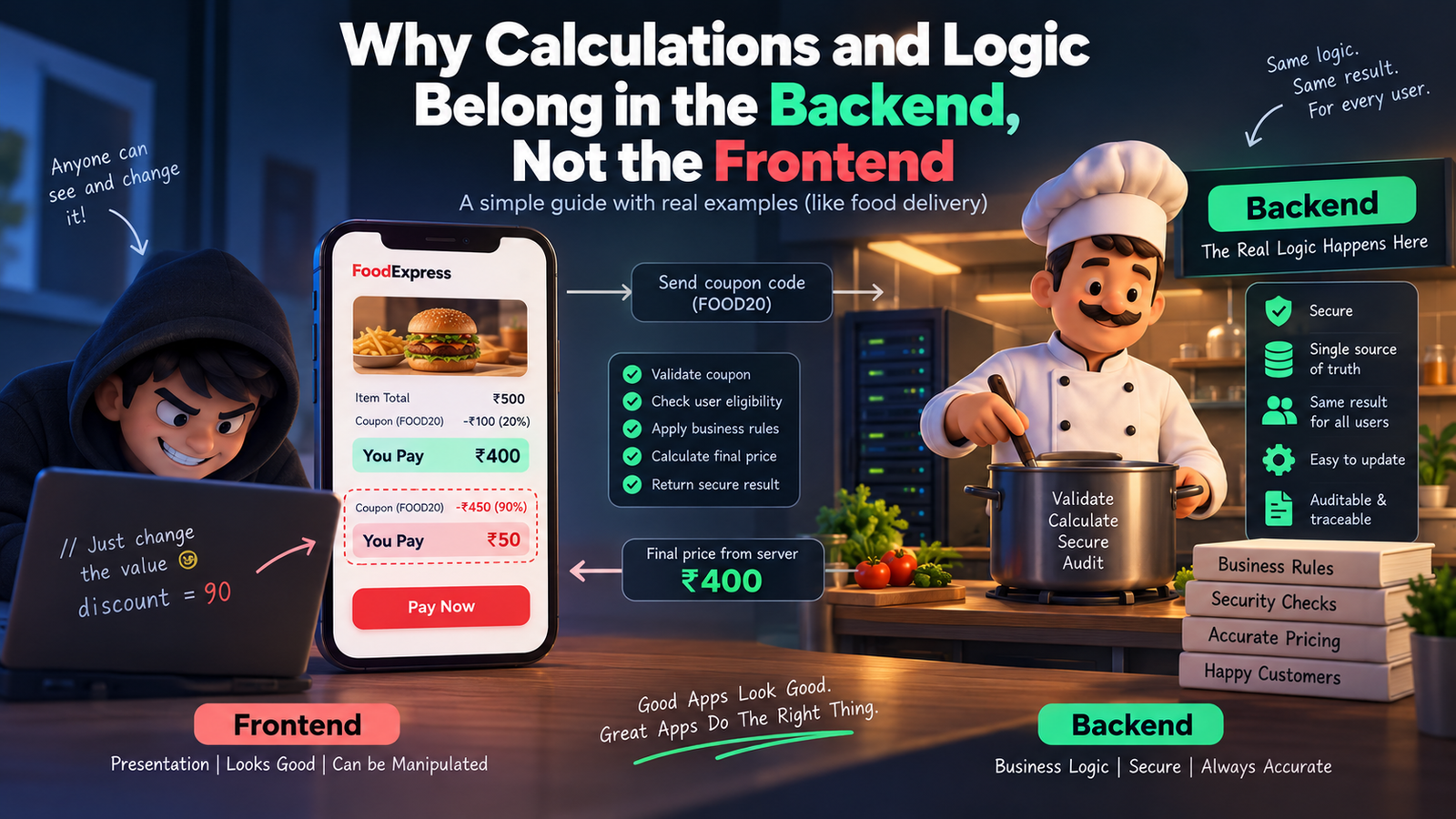
    Picture this. You’re building a food delivery app. A customer orders food worth ₹500, adds a coupon for 20% off, and the frontend proudly shows “You pay ₹400.” Cool, right?

    Except… what if the customer opens the browser console, changes that 20% to 90%, and hits pay? If your discount math lives only in the frontend, you just lost ₹450 on that order. This one scenario explains almost everything about why calculations and logic belong on the backend, not the frontend.

    Let’s break this down in the friendliest way possible.

    First, What Do We Even Mean by “Frontend” and “Backend”?

    Think of a restaurant. The frontend is the waiter — the person you see, the menu you touch, the smile you get when your food arrives. The backend is the kitchen — where the actual cooking happens, where the chef decides how much salt goes in, how long to fry something, and whether an ingredient has gone bad.

    You never let a customer walk into the kitchen and decide their own recipe. Similarly, you never let the frontend decide your app’s real logic. The frontend’s job is to display things beautifully. The backend’s job is to decide things correctly.

    Why Frontend Logic is Risky (The Disadvantages)

    1. Anyone can see and change it. Everything running in the browser — your JavaScript, your calculations, your “if-else” rules — is visible to anyone who opens Developer Tools. It’s like writing your restaurant’s secret recipe on a whiteboard facing the customers. A curious (or malicious) user can tweak prices, unlock premium features, or bypass validations in seconds.

    2. It’s easy to manipulate. Since the code and data both sit in the user’s browser, a smart user can literally rewrite your app’s math using browser console commands. Discounts, wallet balances, loan EMI calculations — all of it becomes editable by whoever’s using the app.

    3. Different devices, different results. Frontend logic runs on the user’s device — phone, laptop, tablet — each with its own browser, its own quirks, sometimes even outdated app versions. If your logic lives there, two users could get two different answers to the same calculation, depending on their device.

    4. No single source of truth. If ten different frontend clients (web, Android, iOS) all calculate the same thing independently, you’ll eventually get ten slightly different answers. Bugs creep in. Trust breaks down.

    5. Sensitive data gets exposed. To calculate something on the frontend, you often need to send it all the raw data first — prices, taxes, internal rules, maybe even other users’ info. That’s a data leak waiting to happen.

    Why Backend Logic Wins (The Advantages)

    1. It’s a locked kitchen. The backend runs on your server, completely out of the user’s reach. They can inspect the frontend all they want, but they can never see or touch the actual logic running behind the API.

    2. One source of truth. Whether the request comes from a website, an Android app, or an iOS app, the backend calculates the answer the same way, every single time. Consistency guaranteed.

    3. Real security checks happen here. Your backend can verify: Is this coupon still valid? Has this user already used it? Does this account actually have enough balance? These are questions only a trusted, protected environment should answer.

    4. Easy to update without breaking things. Change a tax rule or a pricing formula on the backend, and it instantly applies everywhere — no need to update and re-release five different apps.

    5. Auditable and traceable. Backend calculations can be logged, monitored, and audited. If something goes wrong, you can trace exactly what happened. Try doing that with logic running invisibly inside someone’s browser.

    Real-Time Example: The Coupon Discount

    Let’s compare both approaches with our food delivery example.

    Frontend-only approach: The app calculates: finalPrice = price - (price * discount / 100). This all happens inside the browser’s JavaScript. The value of discount is sitting right there in the page’s source code or network request. A user opens dev tools, changes discount from 20 to 90, and the frontend happily displays a fake, massively discounted price. If your backend blindly trusts this displayed value during checkout, you just got scammed.

    Backend-driven approach: The frontend simply sends: “user wants to apply coupon FOOD20.” That’s it — no math, no discount percentage, nothing sensitive. The backend then checks its own database: Is this coupon valid? Has it expired? Has this user already used it? Only after all checks pass does the backend calculate the real final price and send it back. The frontend just displays whatever number the backend gives it — no thinking, no deciding, no risk.

    Another Quick Example: Bank Interest Calculator

    Imagine a savings app showing interest earned. If the interest formula runs on the frontend, a user could tamper with the principal amount or the rate shown in the request and make the app “believe” they earned more interest than they actually did. On the backend, the interest is calculated using the actual account data stored securely in the database — untouchable, unfakeable, and always accurate.

    So, What Should the Frontend Actually Do?

    The frontend isn’t useless in all this — it still has an important job: making things feel fast and smooth. Simple things like showing a live character counter, instantly validating that an email “looks” correct, or giving a quick preview of a total before confirming, are totally fine on the frontend. These are just for a nice user experience, not the final truth. The backend always re-checks and re-calculates everything before anything real happens (like a payment or a database update).

    Think of it like the waiter repeating your order back to you nicely — but the actual bill still comes from the kitchen and the cash counter, not from what the waiter guessed.

    The Bottom Line

    Frontend = presentation and experience. Backend = truth and trust.

    Let the frontend focus on looking good and feeling fast. Let the backend handle anything involving money, security, business rules, or sensitive decisions. That’s not just a coding convention — it’s what keeps your app, your users, and your business safe.

  • Plan First, Build Later: Why Apps Need a Recipe Before They Need a Kitchen

    Plan First, Build Later: Why Apps Need a Recipe Before They Need a Kitchen

    Imagine you invite friends over for dinner. You didn’t check what ingredients you have. You didn’t decide the menu. You just walk into the kitchen and start cooking… something. Twenty minutes later, you’re missing salt, the oven isn’t even on, and your friends are hungry and confused.

    That’s exactly what happens when people build an app without planning first.

    Planning isn’t the boring part. It’s the recipe. And nobody cooks a good meal without one.

    Why Skipping the Plan Always Backfires

    You know that feeling when you pack for a trip in five minutes, throwing random clothes in a bag while the taxi is honking outside? You land at your destination and realize… no charger, no jacket, three left shoes.

    Skipping planning for an app feels exciting in the moment. But it always costs more time later. Fixing a mistake after building is like renovating a house after it’s already painted — way more expensive than just planning the layout first.

    The Checklist Before You Even Touch a Keyboard

    Think of building an app like planning a birthday party. You wouldn’t just show up with balloons and hope it works out. You’d think through a few things first:

    1. Why are we even doing this?

    What problem are you solving? “I want to make an app for pet owners” is like saying “I want to throw a party for people.” For who? Why? A better version: “An app that tells new dog owners if their dog’s weird behavior is normal or something to worry about.” Now it has a purpose.

    2. Who is this actually for?

    You can’t build a birthday party for “everyone in the world.” You plan it around the actual guest — kids, grandma, your gym friends — because each needs different food, music, and vibe. Same with an app. Know your real users: their age, their habits, what phone they use, what annoys them.

    3. What exactly are we building?

    This is the guest list of features. Some things are must-haves (cake, obviously). Some are nice-to-haves (a photo booth, if there’s time and money). Some can wait for next year’s party. Sort your app features the same way:

    • Must-have — the app doesn’t work without this
    • Should-have — important, but survivable without it at first
    • Could-have — a nice bonus if there’s time
    • Later — good idea, just not today

    4. How are we building it?

    This is choosing your kitchen tools before cooking. Will you use a gas stove or an oven? Similarly, developers must pick the right tech (what platform, what database, what tools) before starting — switching mid-way is like realizing halfway through baking that your oven doesn’t exist.

    5. What do we have to work with?

    Time, money, and people. If you’re planning a party for 50 people with a budget for 10, that party is going to go badly. Same with apps — know your budget and timeline honestly before promising the world.

    6. What could go wrong?

    Every good party host thinks ahead: “What if it rains? What if someone’s allergic to nuts?” Apps need this thinking too — data privacy rules, app store rules, security. Catching a problem on paper is easy. Catching it after launch is a nightmare.

    Meetings: Not Evil, Just Often Done Wrong

    Meetings get a bad reputation, mostly because of pointless ones that could’ve been a text message. But good meetings before building an app are like a family planning a road trip together — quick check-ins where everyone agrees on the route before anyone starts driving.

    Here’s what those meetings usually look like:

    • Kickoff meeting — Everyone agrees on the big goal. Basically: “Why are we building this, and what does winning look like?”
    • Requirements meeting — Turning fuzzy ideas (“make it easy to use!”) into clear, specific instructions developers can actually follow.
    • Design review — Looking at sketches of the app before any code is written. It’s way cheaper to erase a pencil line than to rebuild a finished button.
    • Feasibility check — The reality-check meeting. “Yes, we can add that voice assistant feature. No, not with this budget and in two weeks.”
    • Sprint planning — Breaking the huge to-do list into small, doable chunks, like cleaning a messy house room by room instead of staring at the whole mess and giving up.
    • Risk review — The “what could go wrong” conversation, done calmly, before it becomes an actual emergency.

    Every meeting has one real job: catch confusion early, while it’s still cheap and easy to fix.

    The Simple Test for a Good Plan

    If you can’t explain your app plan to your grandma in two sentences, it’s not ready yet. A good plan is simple enough that a brand new team member could read it and instantly understand what to build and why.

    The Takeaway

    Skipping planning doesn’t save time. It just moves the pain to later — usually as a stressful, expensive “let’s redo this” moment instead of a calm conversation on day one.

    So next time you’re excited to build an app, pause. Write the recipe first. Talk it through. Ask the awkward questions early.

    Your future self, not debugging at midnight because nobody planned properly, will send you a thank-you card.

    Plan smart. Build once. Ship happy.

  • The Kitchen Strategy: How Modern Apps Serve Data Instantly

    The Kitchen Strategy: How Modern Apps Serve Data Instantly


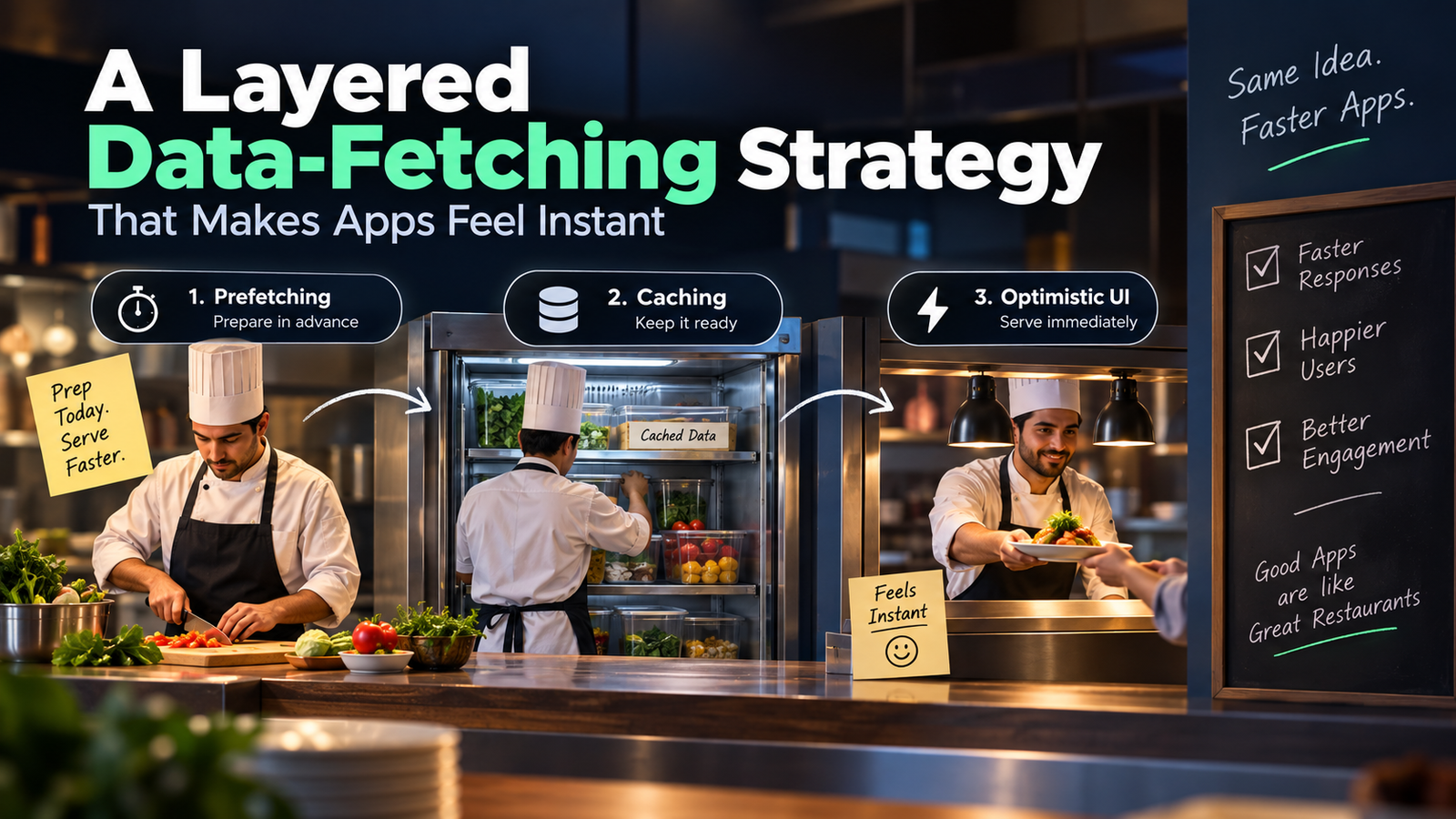
    A layered data-fetching strategy that makes apps feel instant — explained through a kitchen analogy anyone can follow.


    We’ve all been there — you tap a button in an app and stare at a spinning loader for three full seconds. The data was right there on the server. So why the wait?

    This post breaks down a layered data-fetching strategy that makes apps feel instant — using a simple kitchen analogy anyone can follow.


    The Problem With “On-Demand” Fetching

    Imagine a restaurant where the chef only starts cooking after you sit down, read the menu, and place your order. Every customer waits. Every time. No prep, no anticipation — just a cold kitchen that springs to life the moment you ask.

    That’s how most basic apps work:

    // naive on-demand pattern
    User clicks button
      → fetch('/api/data')   // request leaves NOW
      → network round-trip  // 200–800ms
      → server queries DB   // 50–300ms
      → response arrives
      → UI finally renders  // user waited the whole time

    The real cost

    On a fast connection this might be 300ms. On mobile 3G it’s easily 2 seconds. Every millisecond of perceived wait costs engagement — Google found a 0.5s slowdown reduced searches by 20%.

    Meet the Kitchen Strategy

    A real restaurant kitchen doesn’t work like that. It has three layers of readiness that let it serve dishes fast even during a dinner rush. Modern high-performance apps mirror this almost exactly.

    Layer 1: The Prep Cook (Prefetching)

    A prep cook arrives hours before service. They chop vegetables, portion proteins, reduce sauces. When a ticket comes in, the line cook isn’t starting from raw ingredients — most of the work is done.

    🧊Kitchen Analogy

    Prep cook = your app fetching the next page’s data while the user is still reading the current one.

    In practice, this means starting data requests before the user explicitly triggers them. Common patterns:

    • Route prefetching. Next.js prefetches linked pages when <Link> enters the viewport. By the time the user clicks, the JS bundle and data are already loading.
    • Hover prefetch. Start fetching on mouseenter— you typically get 100–300ms of head start before the click fires.
    • Predictive prefetch. If 80% of users who visit page A next go to page B, prefetch B proactively for all page-A visitors.
    // hover prefetch pattern
    function ProductCard({ id }: { id: string }) {
      const queryClient = useQueryClient();
    
    
    const prefetch = () => {
        queryClient.prefetchQuery({
          queryKey: ['product', id],
          queryFn: () => fetchProduct(id),
          staleTime: 30_000,
        });
      };
    return <div onMouseEnter={prefetch}>...</div>;
    }

    Layer 2: The Walk-In Fridge (Caching)

    The walk-in fridge stores prepped ingredients. When a ticket comes in for a dish you’ve made twenty times today, you pull from the fridge — you don’t call the supplier every single time.

    🧊Kitchen Analogy

    Walk-in fridge = cached API responses. Fresh enough to serve, fast enough to skip the round-trip.

    Caching is about answering the question: how fresh does this data actually need to be? Most data in most apps can tolerate a few seconds — or minutes — of staleness. The key insight is to serve stale data immediately while revalidating in the background.

    💡 Stale-While-Revalidate

    Serve the cached (stale) response immediately so the user sees content at once, then fetch fresh data in the background. When the new data arrives, swap it in — no visible loading state at all. React Query and SWR implement this out of the box.

    Layer 3: The Pass Window (Optimistic UI)

    In a fast kitchen, the expeditor calls out a dish at the pass window the moment it’s plated — before every garnish is technically confirmed. The assumption is it’s correct. If something’s wrong, they pull it back. But 95% of the time, it goes straight to the customer.

    🪟Kitchen Analogy

    Pass window = optimistic UI. Show the result immediately, roll back if the server disagrees.

    Optimistic updates apply the change to the UI instantly — before the server has even acknowledged the request. If the server returns an error, you roll back. This pattern is most effective for:

    • Likes / reactions — the heart fills immediately on click.
    • Todo toggles — the checkbox flips before the PATCH lands.
    • Message send — the message appears in the thread while the POST is in-flight.
    // optimistic mutation with React Query
    const mutation = useMutation({
      mutationFn: (id: string) => likePost(id),
    
      onMutate: async (id) => {
        await queryClient.cancelQueries({ queryKey: ['posts'] });
        const prev = queryClient.getQueryData(['posts']);
        queryClient.setQueryData(['posts'], (old) => 
          old.map(p => p.id === id ? { ...p, likes: p.likes + 1 } : p)
        );
        return { prev };  // snapshot for rollback
      },
    
      onError: (err, id, ctx) => {
        queryClient.setQueryData(['posts'], ctx?.prev);  // rollback
      },
    });

    Putting It All Together

    These three layers aren’t mutually exclusive — a real app uses all three simultaneously, each handling a different scenario:

    • Prefetching eliminates wait when the user navigates. They arrive at a page with data already there.
    • Caching eliminates redundant requests. Revisiting a page or switching tabs feels instantaneous.
    • Optimistic UI eliminates perceived latency on mutations. Actions feel local even when they hit a remote server.

    The kitchen insight: a great restaurant kitchen is fast not because the chefs move faster — it’s because the work is distributed across time. Prep happens early. Stock sits ready. The pass window moves without waiting for a full audit.

    Fast apps work the same way. The goal isn’t a faster network — it’s doing less work at the moment the user is watching.

    When Each Layer Falls Short

    No strategy is free. Knowing the failure modes helps you apply them correctly:

    The most common mistake is applying optimistic UI to destructive operations (delete, payment) where an error leaves the user in a confusing state. Reserve it for low-stakes, high-frequency actions where a rollback would be a minor annoyance, not a crisis.


    Speed isn’t just a technical metric — it’s the primary UX of any data-heavy app. A spinner is a broken promise. The kitchen strategy is about making promises you can keep: data that’s there before the user reaches for it, interactions that feel local, and fetches that happen in the margin, not in the critical path.

    The next time you open an app and it feels like a native tool rather than a website, look closer — there’s a well-run kitchen behind the counter.